Skip to content
View in the app

A better way to browse. Learn more.

The AVSIM Community

A full-screen app on your home screen with push notifications, badges and more.

To install this app on iOS and iPadOS
  1. Tap the Share icon in Safari
  2. Scroll the menu and tap Add to Home Screen.
  3. Tap Add in the top-right corner.
To install this app on Android
  1. Tap the 3-dot menu (⋮) in the top-right corner of the browser.
  2. Tap Add to Home screen or Install app.
  3. Confirm by tapping Install.

8 Star Aviation Starts Virtual Medevac Service in Alaska!

Featured Replies

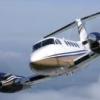
Our fleet of Beechcraft Super King Air B200 serve the Alaskan community as a key feature of the Trauma-Emergency Medical Services system, operating out of Juneau, Ketchikan, and Yakutat. We fly the Aeroworx B200 exclusively, and the combination of this aircraft and the breathtaking scenery in Alaska is just stunning. If you're up for some seriously challenging flying...come fly the King Air into the wilds of Alaska!Check us out at www.8staraviation.com!

Best Regards,

Kurt "Yoda" Kalbfleisch

Pinner, Middx, UK

Beta tester for PMDG J41, NGX, and GFO, Flight1 Super King Air B200, Flight1 Cessna Citation Mustang, Flight1 Cessna 182, Flight1 Cessna 177B, Aeroworx B200

Create an account or sign in to comment

Account

Navigation

Search

Search

Configure browser push notifications

Chrome (Android)
  1. Tap the lock icon next to the address bar.
  2. Tap Permissions → Notifications.
  3. Adjust your preference.
Chrome (Desktop)
  1. Click the padlock icon in the address bar.
  2. Select Site settings.
  3. Find Notifications and adjust your preference.