rmlazzari
Members
-
Joined
-
Last visited
-
-
Many thanks to all, especially to Joe, whose suggestion worked! In Brazil we actually use a comma to separate decimals but BGLCOMP is not Brazilian. With point worked. I chose to create three files for exclusion: one for the runway, one for the taxiway from courtyard to the runwayand the third for the courtyard. The scenery now became very good! And confirmed: a larger negative number is smaller in magnitude, hehe ... Now I can take off and land the beautiful town of Paraty, a colonial city that for those who are in the U.S. remember New Orleans, but the Brazilian way. Everyone is invited. :smile: Thank you again! Renato. P.S.: Excuse my horrible English, pls, it's an automatic translation.
-
Hi, Well, I've downloaded and installed to ADE and a demo version of AFX. They seemed very dificult for me because I just need to change one airport. Then I'm trying excbuilder version 2. I got a XML file to exclude just one object from SDTK runway but now I got a difficul problem to understand: As the airport i'm working in is in Brazil, all the coordinates are negatives. I guess BGLCOMP have some trouble compiling XMLs like this. This program compiles ok the example that comes togheter the excbuilder (execlude_cougar_trees.xml) but it refuses the mine. If someone could take a look in that... The mine, excl_paraty.xml version 1: <?xml version="1.0"?> <FSData version = "9.0" xmlns:xsi='http://www.w3.org/2001/XMLSchema-instance' xsi:noNamespaceSchemaLocation="bglcomp.xsd" > <ExclusionRectangle latitudeMinimum = "-23,215040893284" latitudeMaximum = "-23,2148282353837" longitudeMinimum = "-44,7191451642855" longitudeMaximum = "-44,7189031004053" excludeGenericBuildingObjects = "TRUE" /> </FSData> The answer from BLGCOMP: Parsing document: excl_paraty.xml ERROR C2344: LatitudeMinimum MUST be less than LatitudeMaximum! ERROR C2031: Failed element parse <ExclusionRectangle> ERROR C2032: XML Parse Error! Element tree follows: ERROR: <FSData ERROR: version = 9.0 ERROR: > ERROR: <ExclusionRectangle ERROR: latitudeMinimum = -23,215040893284 ERROR: latitudeMaximum = -23,2148282353837 ERROR: longitudeMinimum = -44,7191451642855 ERROR: longitudeMaximum = -44,7189031004053 ERROR: excludeGenericBuildingObjects = TRUE ERROR: > ERROR: ERROR: Compilation errors detected, compilation failed! Parse complete! Then, just to try, just in case, I've changed the excl_paraty.xml to: <?xml version="1.0"?> <FSData version = "9.0" xmlns:xsi='http://www.w3.org/2001/XMLSchema-instance' xsi:noNamespaceSchemaLocation="bglcomp.xsd" > <ExclusionRectangle latitudeMinimum = "-23,2148282353837" latitudeMaximum = "-23,215040893284" longitudeMinimum = "-44,7191451642855" longitudeMaximum = "-44,7189031004053" excludeGenericBuildingObjects = "TRUE" /> </FSData> and now the anwer from BGLCOMP is quite the same: Parsing document: excl_paraty.xml ERROR C2344: LatitudeMinimum MUST be less than LatitudeMaximum! ERROR C2031: Failed element parse <ExclusionRectangle> ERROR C2032: XML Parse Error! Element tree follows: ERROR: <FSData ERROR: version = 9.0 ERROR: > ERROR: <ExclusionRectangle ERROR: latitudeMinimum = -23,2148282353837 ERROR: latitudeMaximum = -23,215040893284 ERROR: longitudeMinimum = -44,7191451642855 ERROR: longitudeMaximum = -44,7189031004053 ERROR: excludeGenericBuildingObjects = TRUE ERROR: > ERROR: ERROR: Compilation errors detected, compilation failed! Parse complete! It seems it doesn't matter for the parse program if a greater negative number is less than a small one... The files I have in Windows\System32 to parse my file are: 06/06/2012 03:05 1.236.992 msxml3.dll 26/06/2010 01:24 2.048 msxml3r.dll 22/01/2009 03:13 1.328.968 msxml4.dll 22/01/2009 03:12 88.904 msxml4r.dll 01/11/2012 02:47 1.389.568 msxml6.dll 13/07/2009 23:07 2.048 msxml6r.dll and I'm sure I can uninstall all of them because there is not another application using it. Actualy I've installed them (and got more recent versions) just for excbuilder. So I could uninstal any if it is confusing the BGLCOMP. As the airport has three or four objects in the runway, I though to do the same number of exclude files. But I can't do neither the first one... Can someone understand (and help me) with that? :biggrin:
-
Thank you all for the answers, I have downloaded the new program and I enjoy myself a little bit here with them. John, recovering from an accident, a broken leg, I'll take my chances with the Airport Design Editor. But if the learning curve is greater than the recovery, I'll take a xeretada in AFX. You know the name or website that makes it?
-
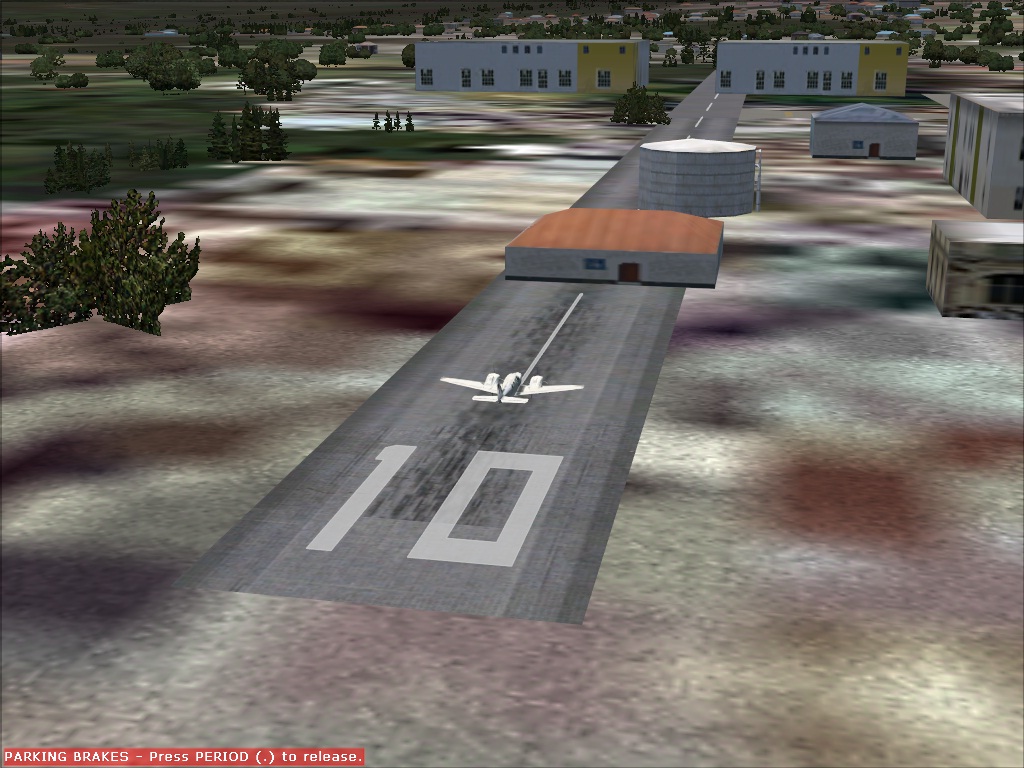
Hello, my name is Renato Lazzari, am 55 years old and I am beginner with FS and even more with AFCad221. I would like to remove buildings and a water reservoir that appear on an airport runway, as seen in the picture I attached here. I think of "cementing" the whole area around the airport. Or you could create a file, I see in other airports, called "exclude" - is it for this that these "exclude" serve? -, since these buildings seem to be the default FS9 and not "leave" the runway nor putting the scenario (AF2_SDTK.BLG, which I can't upload here but I can send if it helps) first in the scenery settings. But I'd really like is some indication of how I do what I want to do. Thank you