


cbtaylor
RTW Race Team
-
Joined
-
Last visited
-
Thanks for linking that thread, Roman. It looks very promising.
-
Thanks for all the comments on boxed vs Steam. Eammon's advice to consider the Saturday flights with Ron and the gang was an excellent point. So the next question is what mesh to use...
-
So I did a factory reset to my trusty-ish Dell over the weekend and am contemplating what to do about FSX. First question is Boxed w/Acceleration or Steam? I own both, but have never installed the Steam version. I had the boxed version pretty well set with Steve's fixer and figure that everything else I own will be able to go right back on and work, so the bar is set pretty high. I would be interested to hear any thoughts on the pros/cons of going with FSX-S, especially with some of the older A2A or PMDG installers for example. I imagine it would be difficult to get updated installers without having to pay again. Second question has to do with mesh. I was using my somewhat dated FSGenesis mesh that I originally acquired for use with FS9 some time ago. For the most part it worked pretty well, but there were a few anomalies in some areas. Is there anything more recent that's better and/or more compatible with Orbx? The last thing would be for any advice regarding what order to load everything back on so I avoid any potential conflicts with scenery (which could have been the source of those anomalies I mentioned). That pretty much covers it. Oh, and I'm not even considering reinstalling FS9. I just don't see the point. Thoughts?
-
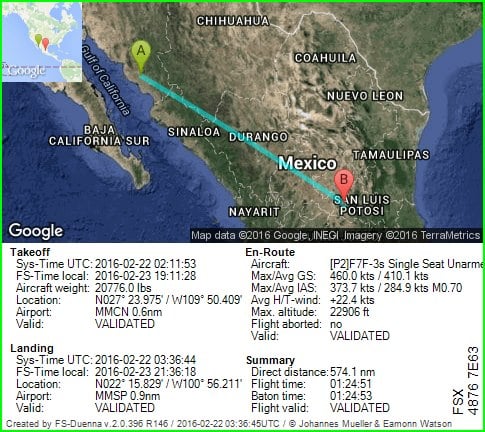
Baton is free at MMSP FlightLog_22-36-45.TXT
-
I have the baton MMCN to MMSP in the Shupe/Madison F7F-3 (Blue)
-
Team Flight Summary for PHHI- PHNY"Beginners Luck" Successful Team Flight Pilots..... arrvoo , Bry Rosier and jt_williams 3 X successful pilots 3 X 5 min bonus = 15 mins bonus 100% of optional team flight requirements completed Race Bonus total = 15 mins
-
Baton is free at PHNY FlightLog_15-00-27.TXT

-
I have the baton in a Beginner's Luck team flight PHHI to PHNY in the default Mooney Bravo
-
Baton is free at WAMG FlightLog_01-03-34.TXT

-
I have the baton WALR to WAMG in the Shupe/Madison F7F-5 (Blue)
-
Baton is free at OOMS FlightLog_14-55-45.TXT

-
I have the baton OEKK to OOMS in the Alphasim FSX F-80 (Navy TV-1 paint)
-
I had a fairly uneventful flight from Bermuda to Halifax-Shearwater during the wee hours of the morning on Day 1 of the race, streaking up the Atlantic seaboard at 4500' with the throttle pushed to the stops. It's always a bit unnerving flying across the ocean at night like that, and spacial awareness can become an issue, and you have to learn to scan and trust your instruments. At one point my airspeed indicator started dropping to zero occasionally, which gave me a bit of a start. Fortunately I thought to immediately check my GPS ground speed to make sure I wasn't actually losing airspeed. This started a mad scramble to find the pitot heat switch. Eventually we determined that I had to use a keyboard shortcut because THERE ISN'T A PITOT HEAT SWITCH IN THE F-80!!! :t0105: So that's definitely going on the gripe list. Hmmph.
-
Baton is free at CYAW FlightLog_01-55-55.TXT

-
I have the baton TXKF to CYAW in the Alphasim FSX F-80 (Navy TV-1 paint) - Thoroughbred leg


