Skip to content
View in the app

A better way to browse. Learn more.

The AVSIM Community

A full-screen app on your home screen with push notifications, badges and more.

To install this app on iOS and iPadOS
  1. Tap the Share icon in Safari
  2. Scroll the menu and tap Add to Home Screen.
  3. Tap Add in the top-right corner.
To install this app on Android
  1. Tap the 3-dot menu (⋮) in the top-right corner of the browser.
  2. Tap Add to Home screen or Install app.
  3. Confirm by tapping Install.

drmalukar

Members
  • Joined

  • Last visited

Everything posted by drmalukar

  1. thanks buddy for the advice. I have uninstalled RC 4.3 and reinstalled to another drive ( D drive). as i'm running win7 initiated RC directly with out clicking "Run as a administrator". now its working perfect. thank you once again
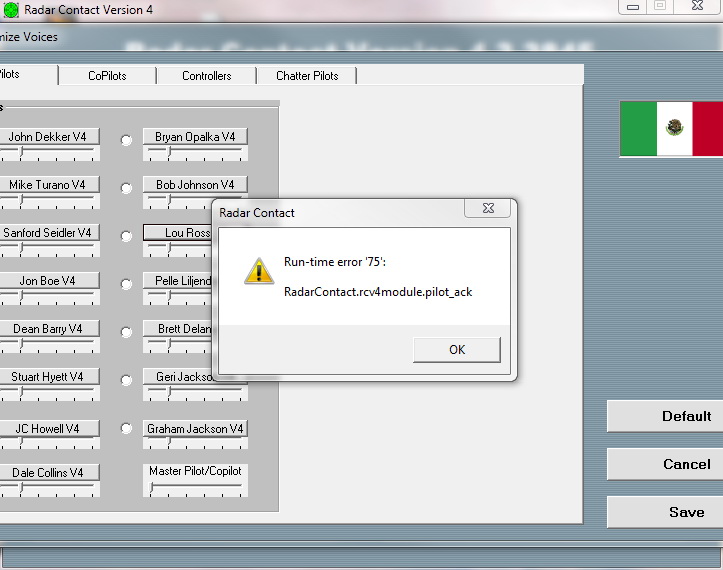
  2. After installation of RCv4.3 when trying to hear voice of pilot/co-pilot/controller , getting "Run time error' 75; RadarContactrcv4.module,pilot_ack " when pressed "OK" RC exit. rest of the functions are working. i can hear chatter voice. I'm having win7. tried so many things , i.e. turn off antivirus ( micrsoft essential security) , given permission to RC folder and .exe; installed after turning off antivirus; used Reg. cleaner. could not find answer in FAQ and forum also, please help and advice. Captured error window attached thanks
Account

Navigation

Search

Search

Configure browser push notifications

Chrome (Android)
  1. Tap the lock icon next to the address bar.
  2. Tap Permissions → Notifications.
  3. Adjust your preference.
Chrome (Desktop)
  1. Click the padlock icon in the address bar.
  2. Select Site settings.
  3. Find Notifications and adjust your preference.