

Plant Inspection

By Gaiiden
· 937 views
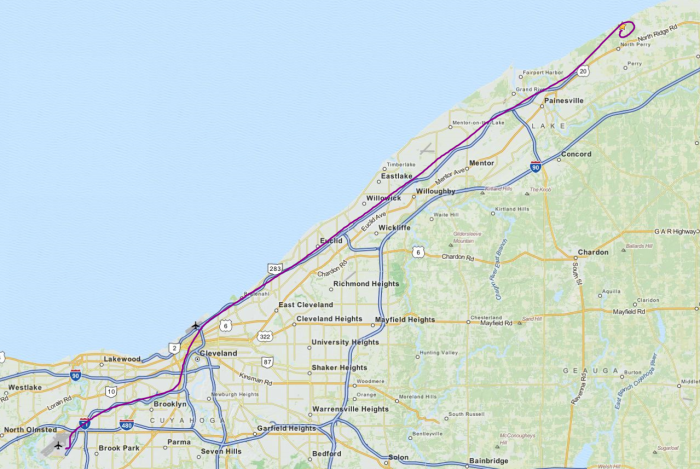
The Cleveland scenery package includes a nuclear power plant that has a heli pad, so for this flight I role played as a charter pilot who was hired to ferry a nuclear inspector to the plant for an unscheduled spot check. The inspector arrived from Washington D.C. on a private jet and then transferred over to my helicopter for the final leg of his journey. I found a new paint for the Dodosim Bell 206B that was to my liking, although I tried to find something government or corporation-like first. Other than that there wasn't much else to do to get ready for this flight.
I departed Cleveland International (KCLE) and used interstate highways to lead me first to downtown Cleveland and from there I picked up the interstate that would take me out to the power plant. Simple, although I forgot to orient myself before lifting off so as I rose I had to figure out which direction to head off in! With roads I've learned it's still very hard to tell which road is which - even major highways. Luckily there were lots of other references for me to use as well such as waterways and railroad tracks. I had Plan-G open, which gives me an uncluttered view of the roadways, but I was able to use the Cleveland TAC just as easily to identify where I was. I was tuned to the CTAF while flying and heard a departure call across my route from Lost Nation (KLNN) but was clear before they actually took off.
Upon reaching the plant I did an overfly of the cooling towers - too bad they couldn't simulate updraft, I'm sure it wouldn't be a good idea to do this in real life but that's what makes a sim so much fun sometimes. I circled around to land, there was little to no wind so I just used the circle to lose altitude for my approach. I managed to slow down low over the ground to a walking pace without coming to a full stop hover short of the pad like I normally do. So I made the last few dozen feet at almost a hover taxi and settled a bit rough onto the pad but not enough to bounce or damage the skids - and I didn't futz around either just made an overall smooth and professional-looking approach. I was quite pleased with myself.
I had planned a return trip but didn't have the time for it so this flight ended here. I have one more helicopter flight to try tomorrow if the weather permits.
Recommended Comments