


FlyTweety
Frozen-Inactivity
-
Joined
-
Last visited
Everything posted by FlyTweety
-
Yes
-
I already installed the voice control version (but not used it) . Is a next to next installation possible and maybe a simple switch between both versions? Or have i to uninstall the voice control first (or during the installation process)?
-
Do you think, this limitation is still valid for P3D? As far as i know LM has changed and expanded a lot in the new SDK, maybe by chance you have more possibilities there? Unfortunatly i´m still to "stupid" to read the SDK, i only follow the statements from LM.
-
One single question: Do you have control about the landing gear during take off? I noticed as i tried to set up "realistic" prucedures for TNCM (St. Maarten) that i need to handover the control to AISIDSTAR very early (at the latest 300ft over ground). But, doing this that means that the Aircrafts don´t have the time to fully retract the landing gear. Smaller Ai´s slightly better, the KLM 747 continues the climb with landing gear 3/4 outside. Not a showstopper, but it is looking strange though :rolleyes: .
-
Well, after a couple of hours in EDDF i´m still unsure :mellow: No doubt, the assign of the STARs regarding the Wind direction now works great. Not perfect is, that it now happens that the AI follow e.g. a STAR dedicated to the RWY 07L and finally the ATC assign the RWY 07R. That´s not perfect because obviously this swing overs crack the separation because the final is short. What me really leave desperated is the fact, that it seems to be impossible to "trust" the ATC. I wrote long spreadsheets of where P3D asssign the Runway (IAF). Now you can think, it is simple to "optimize" the STARS and let each AI pass this Area. At the certain day i noticed, that all Traffic of a certain STAR receive their Runway between Fix DF439 and DF444. Great. Now you go to work 5 days and start the sim again one week later. What happens? From 10 Aircrafts only 3-4 get the Runway in the usual area, 6-7 NOT :angry: . And you know what happens when you have a "sixpack" of Airliners entering the Final without clearance <_< . Looking at the ATC window show tons of messages like "25 expedite your climb to 12,000 ft", "1048 expedite your climb to 15,000 ft" It´s all the traffic that was failed to assign the runway while the AI in front at the same track did. I think, as long as the fu...g built in ATC will not be replaced by a more smarter your tool will have a hard stand. But also with assigned Runway it happend often, that the AI turned back at short final. First it had a STAR and a Runway, after leaving the last STAR WP the Runway was left. After passing the first one or two Final WP the AI turned and the Runway wasn´t shown at the monitor as well. So the AI was wandering arround. This happend randomly for about 15-20% of the landing Aircrafts.
-
First observation: Basically now the assigned runway fits to the STAR (and vice versa) Now frequently a message appears: EXEPTION = 20 = "six digit number" index = 1chData = 24 Also, the seperation is kept less. Testground is now EDDF included the "new" Runway. But i definitly need more time to "play"
-
I will check it out, but compared to January/February i have much less time because i´m back in my Job. So it might take a few days.
-
Good to know :smile:
-
As described earlier, i start AISIDSTAR at the earliest when the conditions are stable. The first 2-3 Aircrafts taxi out to RWY 23L, my Laptop with FSC 9.2 shows matching wind direction, all good. Then i start the AISIDSTAR Monitor, from there i start the tool itself. After the startup you read in the Traffic, i start the Data collection, and from the first second i notice a 50:50 allocation between 05R and 23L regarding the STARs. And, as described, this continued yesterday for more than half an hour. At no time one AC was taxiing or departing from 05R. I wonder, why you don´t use your readout of the Data collection to verify the plausability of the STAR? There is a existing telemetry file that says, 23L is assigned for each and every taxi out from EDDL. Isn´t it possible to take that file to read e.g. every 10 seconds the landing runway and if the assigned STAR isn´t matching, you reassingn? Also strange, the new version seems to produce more "breakouts" than before. Traffic that is just feets away from the first Final Waypoint and switches to the "enroute" mode turns 180° to catch the IAF again. This happens randomly, from a complete chain of 5 AC using the same (correct) STAR and with a valid assigned Runway 2-3 do not enter the Final but turning arround. I´ve no clue why.
-
Copy that. On my testground EDDL still 30-50% receive the wrong STARs, not only at startup but also after 30 minutes uptime. No runway change at this time, all aircrafts departing at the same (odd directed) runway.
-
I wouldn´t die for it but i am sure, that the first part is without any acceleration, means 1x. Will confirm it tomorrow after trying the same flight again. You are right, this is right in the IAF area. But apart from LOWI i experienced that behavior (Rattlesnake"walk") at many places as soon as the AI is assigned to the "Final" File. Would be great to have this additional parameter, this would wipe out some of the "unrealistic" flight patterns where we don´t really need them. Take LOWI again into account, here we need first the AITurnScalar (i used 1.4 for the "normal" STAR) to be able to turn 180° in the tight Valley (soft mode), even later the "hot" mode to enter the short final (no further turns needed). Otherwise, with the default setting, the Valley is to tight!
-
Basically like a Kameleon: Right eye at my Notebook, where FSC runs. You might see the AI meander left and right about 10° The left eye on the main screen where i follow the AI from anywhere by using large zoom settings. There i can see that FSC is WYSIWYG (What you see is what you get) The only thing that is different are the stutters, this is related to the slow hardware of my Laptop and the CPU consuption during recording (single core). In the Sim the AI really looks like a snake... By the way, in the second half you can see what happens to me with 4x speed
-
*sigh* OK, you say, it works for you, my opinion is, it don´t. Maybe i´m to German, expect to much perfection. I tried your procedures, though you use different waypoints, the behaviour is quit the same: After leaving the STAR and entering the Final the AI switch to the Approach Mode, means e.g., it flys all the way with extended landing gear. Further is begins to react like complained, 90° turns within a circle of 100 ft, barely able to fly straight but allways meanderings within 10° left/right. By the way, time warp 4x let your control totally collapse in this mode, the AI is turning unpredictable on its way to the next WP. So you might be right when you be convinced "it works" if AIsidstar bring the AI down to the Runway somehow, but to me it is not comparable to "normal" Approaches. Therefore if have again some questions to understand the tool better. 1. What is the trigger for a successful handover from the last STAR WP to the call of the FINAL Approach? Why did it not work for me to use the STAR to pass the P3d IAF, earn the Runway assignement, continue the STAR down to the short final in RWY direction? The only what had to happen is, that at the end of the STAR, (which provides me the smooth 2 min. turns) it need the switch to the FINAL file. In my opinion all desires are fullfilled: IAF passed, Runway assigned, Runway and first WP of the Final close straight ahead. 2. WHAT is controlling the AI attitude during the Final Mode? Is it part of the .air file or has AISIDSTAR the full control at this time? Would it be possible to add triggers into the program to enable us to change the assigned algorythms depending to the waypoint. So that the very fine control e.g. starts at or below 2000 ft AGL? Like <attitude>NORMAL</attitude> <attitude>FINE</attitude> 3. HOW do you really read the Runway direction? You told me before, that you first start your sim with customized weather to be sure that all the traffic has the same wind. I tried it again and again. Start the sim, switch off OPUS, choose EDDL as the desired Airport, change the time, customize wind to 230° 16 kts change the Aircraft to BOB. Then i open the flight and move in a position where i can observe the Traffic. At my networked Notebook i let run FSC 9.5, GPS connected. I can read in the upper left corner windspeed and direction, 16 kts 230°, like selected. 100% of the Ground Traffic is taxiing to the Runway 23(L) THEN i start the AISIDSTAR Monitor.exe , from there i start AISIDSTAR. At this time the sim is running about 2 minutes. The Monitor Window shows all "taxi out" Traffic to RWY 23L, and guess what? Out of 10 incoming Traffic AI´s 3 to 7 will equipped with STAR Files for RWY 05. At no time the Wind has changed for more then 5 milliseconds, you know, it is fixed in the setting and i can read it all the time. So, what is wrong? Also, as mentioned, it don´t turn better, after one hour ore more it seems to turn even worse with less than 30% correct STAR´s. What can i offer to you that you see that i don´t cheat? Regarding to your depression about using your Tool preferred for the "extreme" Airports: What did you expect? Simple Approaches working satisfiing anyway. OF COURSE we use Aisidstar to crush the limits. circling Approaches, visuals with changing headings, steep Approaches. And yes, to keep the separation. We really need it not at simple Hillbilly Airports with one Runway, no obstacles arround and one flight per hour.. The fun is to create working Aprroaches under circumstances where FSX/P3d fails. It is no alternative to delete AI before taxiing in, if i don´t want to see that i can allready free the Approach way earlier with FSUIPC. And if i want it simple, why using decent AI at all? We could use cubes instead of frameeating Models. Big red cube for Heavys, midrange yellow cube for narrowbodys, small green for Buisness and GA. FSX does´t care about the shape, it will "fly" anyway related to the config, but with far better FPS... You should surrender, the main reason is that we are childish and want to watch traffic as spotters or love to tinker like the guys with their model railway...
-
For LOWi basically this is easy: You need a second program like Flightsim Commander that shows you all the traffic. Without AISIDSTAR running you open the ATC Window and watch/listen where the ATC assign the Runway to the AI. Finaly you add a Waypoint (or use a existing) in this area and add it at first to the STAR´s. The problem is that is looks stupid regarding traffic that is is injected in the odd corner. The AI appears east from RTT, flys direct to the clearance area southwest of the Airport, then all the way back to RTT and starts his "visual" approach. But i didn´t found another way to be sure that i have a valid assignement :(
-
I tried it, but without success. Though i changed some Waypoins (one per test of course) from type "Named" to "IAF" and "FAF", P3d doesn´t care about it. I could find the area, where i get the runway assignement for sure, but that was it. The rest is in god´s (ah, P3d´s) hands.
-
Well, finally, to answer the question i decided that i will write custom approach files for each Airport of my interest (or there will be downloadable procedures one day). Until today i´m not really satisfied with autogen approaches, they work to accidently for me. But, i´m convinced that a lot of the speed adjustments belongs to the separation. Because, what else can be thereason to slow down to 47 kts with an B757-300? It is lot more than slowing down to Flap speed. And that is what is disturbing a lot. Might be that the Traffic have their seperation of 4 nM in my case at the begin, but slowing down that hard end up in loss of separation in seconds for all the Traffic in the final. Sure, it should be ajustable, but for some reason it don´t work for me frequently and fall below the setting of factor 0.8 Nevertheless, also the custom Approaches have still their limits. E. g. LOWI (Insbruck Austria) RW 08 is currently not doable. I must lead the AI to an area in the west of the Airport to get the Runway assigned. Then back to NDB RTT and further the "visual" Approach. Problem is, if i put all waypoints in the STAR, the Approach looks fine and smooth til the end of the STAR. But instead of proceeding to the Final the AI turns left into the Mountains, obviously to catch the P3d/FSX IAF. When i put all the Waypoints in the Valley into the Final instead, i have again the behaviour that the AI turns outright like slewed. So, maybe it is possible to create a third way by using a "special" Final with the algorythms like in the STAR. Currently i´m not able to check it out because i rearrange my Computer.
-
OK, after another 11 hours of testing i think, it is time for one more longer posting :rolleyes: Hope, i can tell my results without too much quotings. Regarding to your first answer, is wasn´t able to reproduce the same issue again, but i have a suspicion: The first message in the "Dos Window" was about "Condor 1234 Flight 4711 (B2D3H) identified near destination airport EDDL is NEW, assign new AI index = 1 ...." This was meant with Aicraft ID To clarify the following you need to know, that i use to spot the traffic with the "Aircraft" BOB from Orbx, hanging around at the sky. What obviously happend is, that i moved my BOB to close to that Condor AI, and forced it in a holding. Because i found a message yesterday, that i possible misread monday. It says :"..Condor Flugdienst Flight 1234 (DE4DH) detected conflict with user aicraft object ID 1".... So it seems, i must apologise for this misread, the ID 1 was given for the AI and for the User Aircraft. It didn´t saw himself. Second point is the "predicted landing seperation" and the "speed variation" Again first one apologise: I mixed up the parameter AITrafficSpeedAdjust with AISpeedScalar. So my setting did not have the intended result. But nevertheless my point of view is, it don´t wotk. When you take a look at the screenshot you see what i mean: There are 3 in a row, but i is the one in front with the lowest speed, the second is faster and the third even faster. This was the situation at about 10 nM at the STAR and as you can see, still in the Final. This is leading into a compression, and this is why i belive, that anything is still wrong with the calculation of the separation. By the way, Runway was free, the only reason to stow down might be the crossing GA, but this is designated to EDLE, not EDDL. Turnings: Yes, your assumption was right, this was related to the different vectoring algorithm between STAR and Final Files. I rember, the mentioned flight that was hitting perfect the drawed line was after i moved all those waypoints to the STAR. Unfortunatly than it happend that the AI turned right instead of turning towards Runway direction **. And even worse, as described, in the following hours almost every approch went wrong before arriving DL 530 so that i quit and didn´t really understood why the one turn was successful. At least, now it is fine. ** Adding DL455 was the solution, my own STAR was ending with DL450, the Final begun at NATOS. Finally i added more additional WP to the STARs to follow the glideslope and start the Final at abot 1550 ft, beyond DYNDB. Also holdings are switched of. This works best for me. So, what is left now? - AI separation is still more or less a product "by accident" - Still big issues regarding the assigned Procedure. Today again more than the half of the assigned STARs are in the wrong direction. Therefore the very most AI´s never come close to the IAF and also don´t get a Runway. - Again few AI´s with assigned Runway but no Pattern - Monitor Window Size and filter of choice - sometimes the Message that the temporary telemetry file cannot be accessed by aisidstar (somewhat like that) And new: After installing the P3d v2.1 update this morning out of sudden the roll out is not right anymore. AI´s are stopping way before the assigned exit coordinates, though i adusted them several times now, there are differences of more then 300m between landing arcrafts. Currently my coordinates pointing a spot in the middle between Exit L8 and the high speed exit L7, the Aircrafts are stopping in the middle between L6 and L5 (half the runway) I will try to investigate this. I send the current EDDL package to your hands
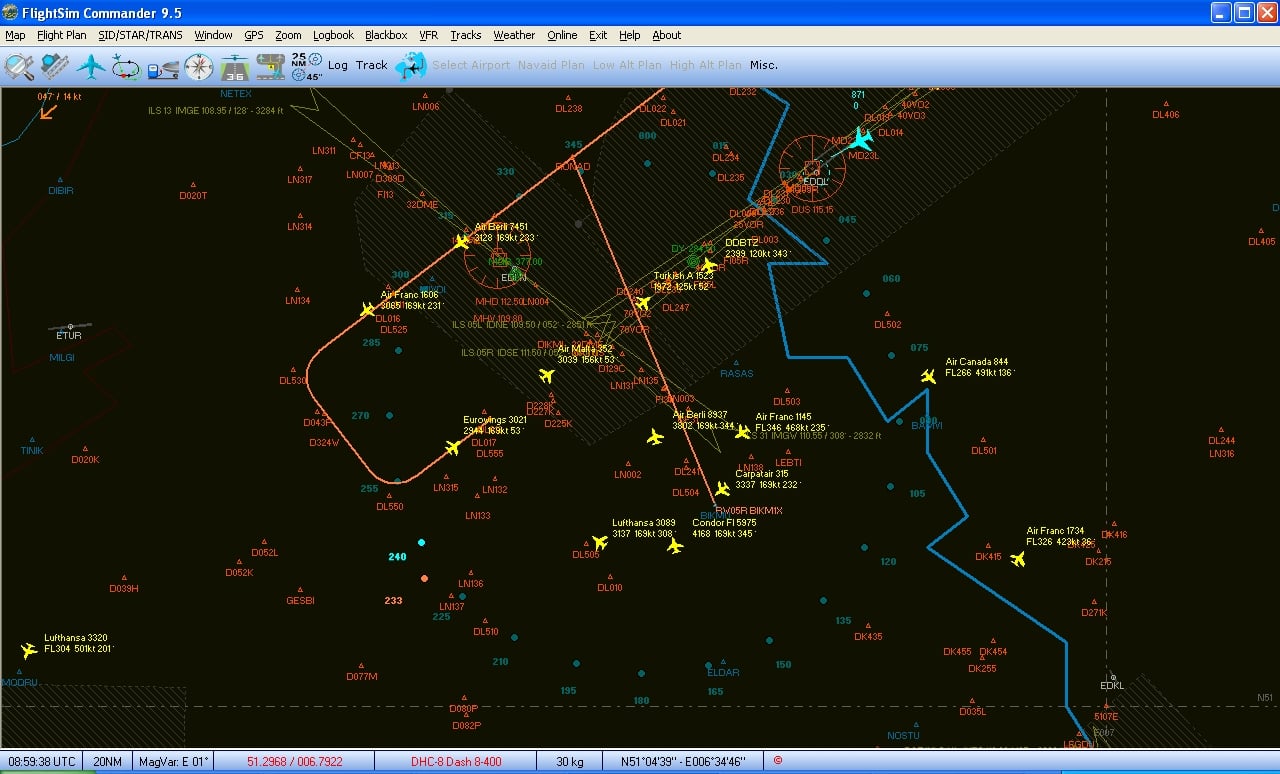
-
Hi Roland, i´m sorry to say, the new rev. don´t work for me at all. Seems it is worse... I try to describe it in Order: To stay focused at only few AI´s i only tinkered with the STAR BIKM1X and a following transition. Behaviour 1. CONDOR1234 is comming from south, passing BIKMU and get RONAD as next. Passing RONAD, next WP DL530, which is the first WP of the "Final" File. Instead of turning left for about 100° the AI is turning right and doing a preety big circle with 260°, heading DL530. Why? The Monitor says, its a Holding because lost of serperation conflict with Aircraft ID=1 Scrollig back in the Terminal Window and i couldn´t belive it: The AI with the "ID 1" IS Condor 1234! It "saw himself"... Restart Behaviour 2 CONDOR1234 is comming from south, passing BIKMU and get RONAD as next WP. Passing RONAD, next WP DL530. AGAIN a holding over RONAD, this time because of a Eurowings Aircraft less then 3 Miles. I tried hard to find it, finally i located it in the area between VALSU and NIKOG, (not at the picture anymore), thats about 10-12 nM! Restart Behaviour3 Lufthansa1111 is comming from south, passing BIKMU and get RONAD as next WP. In the meantime Air Malta is comming close from the right, 58kts fast. From behind in his trails a Eurowings with 240 kts. They are all joining together and i had have a package of 3 AI´s with 58 kts snailing trough the air. Finally the Eurowings won the rumble and accelerate, heading DL530. Right over DL530 the AI slow down to 58kts and turns outright like a heli. Same at DL550. But in the meantime one more Aircraft came along over another north STAR, passed RONAD and followed exactly the drawed line at DL530. WOW But before i got lucky i saw first a assigned WP DL550, then the Aircraft turning right (?), then i missed the AI in the list and finally i found it "enroute" controlled by FSX *wallbash* So i tried it several times, but it tends to be impossible to get a single aircraft on the track because... whatever. The tool struggle to decide which Aircraft is in front and which has to slow down, the tool struggle to keep or get control over the Aircraft. One Aircraft was circeling 30 minutes in the LOC area with assigned RWY 5R but did not get Patterns. The tool struggle to control which "diameter" a turn should have. And finally the new rev. seems to assign almost each turn in the wrong direction. So, in my opinion it is currently impossible to get valid results in my "testbed" with UT2. Basically the only way is going back to the roots, simple Airport, only 1-3 Aircrafts and then checking the basics, mathematics, rules. Nothing for a public beta, rather doing homework.
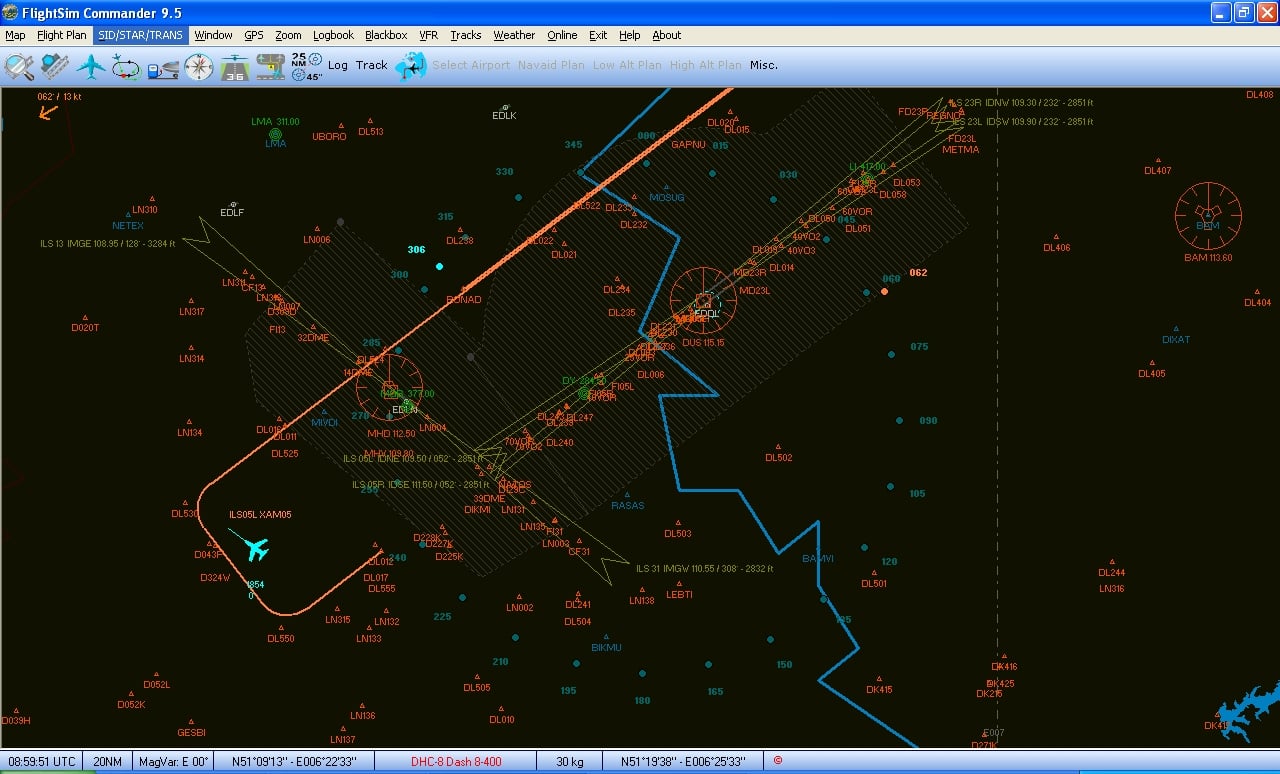
-
Because in this tryout phase it is necessary to observe a few AI´s to find stupid behaviours i have three more requests: Can you please make (or allow) the Monitor Window wider? I use a 1920 x1200 px screen for that Window. But to see the complete line it would be usefull to have it wider, because now, when i want to read the "Special Commands" i cannot read the full Pattern, when i shift the column of the Pattern, the Commands are out of sight... 2. Though it is possible to highlight one single Line, after the next Window update the highlightning disapears. Can you establish a function that the highlight of a flightnumber keeps alive once set? 3. I would appreciate filters very much. At big Airports there are dozens of sleeping AI´s which are frequent not too interesting to have them in the list, it would help a lot to switch them off case sensitive. Same e.g. enroute Traffic above a given Flightlevel. That all will help to keep the List cleaner. After all, i still don´t understand if there´s a stable system regarding turns of the AI´s. Example 1: AI flies down the STAR, followed by a handmade Transition. There is a waypoint 90° (say D001) left from the passed. The following is another WP 90° left, (say D002) and one more 90° left, the FAF. So the complete Pattern is a U-Turn, the distance is little wider than a standard 2 min. turn. -AI overfly D001, starts to turn left, not 90°, not 180° but something 110°, then straight. The heading is NOT to D002, so the AI passes D002 in a short distance. About 2 nm later the Aircraft stops, turns outright more than 150° with heading somewhere between D002 and the FAF. Adjusting AITurnScalar or DistMOE doesn´t help. Why does the Aicraft don´t catch the heading to D002? If it would do so it will be a perfect standard turn, ending up in a good allignement to FAF and Runway. Example 2. LOWI, handmade VFR Approach RWY 08. Same situation, but here the AI overfly D001 a few feet, turns right outright 90° heading D002 (obviously slewed), then the short way to D002 and again a slewed 90° turn. The reality shows, it is possible to fly that turn, so why the AI have to turn twice outright like a Helicopter? LOWI is generally an example for a missing function. Under no circumstances the AI received a Runway assignement after completing the STAR. So of course it starts circling close to the Airport. Right above LOWI he gets his Runway, yesterday the 26. Seconds later he gets a new pattern, Close STAR TUL3A (shortened). This would be great, you know, LOWI is demanding and usually approached over RTT. But instead of this, a few more seconds later the Pattern is switched to FINAL 08 (why?), of course that means, AI flies the complete way in opposite direction, turns outright 180° at RTT and then back the Final. If he would at least FLY a 180° turn, but allways that slewed behaviour... I would appreciate a function like NoFinalHeadingMoreThan90° and NoFinalDistance= though, so that it can´t happen to receive the Final Pattern above the Airport.
-
Roland, could you please explain a little bit more about the FSX (in my case P3d v2) generated IAF´s? Because, this is still one of the worst things that there are far to many AI´s without assigned Runways crowding the holdings. Is there a a possibility to get more influence about it? E.G. is that IAF waypoint fixed located so i can add a waypoint to the STAR or Final to get a higher chance to meet the IAF and get a Runway? Or does it help to add approaches in the AFD to withdraw the maybe unreachable FSX IAF? Beside of this, i would please you again to add a function of reassignement of a STAR if the assigned Runway is in the odd direction, the current system leads to too much chaos in the sky. The Final approaches are getting better and better the longer i tinker with the "Final" files. The rollout is about to be okay in case of handmade Files, i switched off the Autogenerated Final Aproaches in the meanwile, as they still won´t work. But that´s ok, it means a lot of work for thousands of Airports, but finally i think, it will be community work if your tool is finally "stable". There should be one who collect the files (you ;-) and after a cleanout it can be uploaded e. g. to the AVSIM Libary. Not a big thing...
-
Damn, than i missed it in the manual. Well, at least i figured it out by try and error :rolleyes: Jeez, if this works, the FS-Community will kiss your feet :im Not Worthy: "Brake to Vacate", will fix one of the worst things regarding to AI-Traffic. Hmm, but is there a possible solution? In this case i couldn´t see any assignement to RWY 5 at any time ( i used your Monitor-Window on a seperate Display). Is it possible to improve the readout of the active Runway? It destroys the whole chain of incoming Traffic when Aircraft follow the entire STAR for RWY 05 and finally pass the Runway at 3000 ft to get to the FAF of RWY23. Separation gets lost, some Traffic turns back at the ILS, lots of confusion. Maybe there´s a better way to check more frequent what is the right STAR and maybe it is usefull to re-assign another STAR when it turns out, that the majority of the traffic still uses e.g. RWY 23. 5 Stars would be, if the wind changes, all landing Traffic will send into Holdings until the last Aircraft finished its "taxi out" from the "old" Runway. Looking forward for v 2.0 :p0311: :lol:
-
Hi from here. Now, after about 3 Days or 25 hrs of trying, changing observing for only one Airport i must say, i failed to get the tool running well. First of all: I´m using P3D v2, so im unsure if some problems might be related to a different simconnect.dll. In every point i´m taking about the EDDL (Düsseldorf) Add On from Aerosoft. Further i use UT2, but about 70% of the FDE´s are modified to get a more realistic rollout (maybe 1200 m for Narrowbodys, 2000 m for the fatties) After trying to let AISIDSTARS run "out of the box" i ran into dozends of issues, not a single approach went well. There have been 2 main reasons: The brake settings i did in the FDE now are out of funktion. So the Aircrafts stopped immediatly after 300ft. You need to know that in EDDL the first exit is almost at the end of the 3000 m Runway. So the taxi time is exorbitant, no chance for following traffic. So i tried the Settings you mentioned above, but without a satisfying result. More worse was that the AutoApproach won`t work. Out of the Box the STAR is too short, after passing the last Fix RONAD or BOTNB the Aircraft turns right to the ILS, but way to tight to the runways so that the overshooting couldn´t leveled out. Now i made the descission to modify the STARS according to the Charts. Final Waypoint is DL016 for RW 05 and DL004 for RW 23. Both are exactly in Runwaydirection, distance about 15 nm What happend now is that the Traffic follow the STAR, but instead of passing the FAF e.g. REGNO in case of RWY 23 they took a hook over a non existent Waypoint 30° from the RW heading and turning back in the same missangle, heading to the middle of the Runway lenght. There, the Aircraft have been droped like a helicopter during a emergency landing with autorotation anywhere in the Grass next to the RWY. So i got rid of Autogenerated Approach and added my own approach files according to the RNAV Approach. So this is how it looks now: Not using altitudes leads to traffic overfly the RWY in 3000 ft, to the end of the Runway, making a very tight 180° turn and flying back to the FAF. Using altitudes like recommended let the traffic doing a low pass in 500 ft, same end. Adding the altitude for the touchdown more or less 0 ft AGL let the traffic digging through the woods half a mile before arriving the Runway. But at least he´s on the ground So the final solution was an altitude of 185 ft for the touchdown Waypoint. Usefull to know that the Airport Altitude is 153 ft, so that leads me to the opinion that the field asks for MSL instead of AGL? Worth to check this... Also i need to use the settings: AIRollOutTime = 30 AIRollOutSlowDownRate1 = 0.1 AIRollOutSlowDownRate2 = 0.1 AIRecordRollOutSpeed = 60 to stop close enough to the exit to shorten the taxi time to minimum . You see, 0.1 is already the bottom line. May i request a adjustment of the default setting to get more air under the wings for even harder cases? What is still bad? Well, first of all the assignement of the STARS. In my case it needs not only "a few minutes" after start until all incoming traffic have a matching STAR. I use OPUS for the weather, my procedure is normally, i start on the default Airport, change the "aircraft" to BOB from ORBx for a better sight, wait until the weather is loaded. Then i move to EDDL. Normally the first half hour the assignement looks like given by chance 50:50 wrong/right. Though the active runway is e.g. 23, at least the half of the NEW injected traffic will assigned to RW 05 STARS. After 30-45 minutes it looks fine, all traffic assigned to RWY 23. BUT: Finally i experienced after watching the traffic for another 2 hrs, the assignements moved to RWY 05 again! 100%, without exeption. Active and from P3D assigned Runway was still 23R. I didn´t understood. I hope, you can achive a major improvement here. Also still to hard is the Slow Down Scalar while following the STAR. I´m pretty sure, the STARs are long enough to get a propper separation. Nevertheless AISIDSTARS tends to slow down the second Aircraft to hard (220 vs. 144 kts) and forces a traffic jam in minutes because number 3, 4 and 5 aren´t able to get alternative vectors to get more space. There are more than 30 nm left beginning from the first Waypoint, but this tool tries to archive the seperation urgently. Maybe it would be better to ignore the missing separation longer: While using the STAR No. 1 keeps the Speed above 220-240 kts, No. 2 to "n" decellerate minimum to 200 kts. While No.1 "escapes" and is finally above the separation distance the former No. 2 speed up to the Speed of 220-240 kts and so on. Also it looks like "following" traffic will released to late from slowing down. I found traffic fly down the ILS with 64 kts while no aircraft was on Runway or Taxiway. Finally at the Waypoint before touchdown it was released. So overall, i´m highly thrilled about this tool, but it looks like there is still hard work to do to make it charming. Thanks for reading
