


csturdiv
Members
-
Joined
-
Last visited
Everything posted by csturdiv
-
Well I believe that my issue has been resolved. Ever since updating my drivers with the help of SlimDrivers Free, my PC has been stable and no crashes. It has been almost two full days now without a BSOD and reboot. Now that I said that, I'll probably have one later today. :lol:
-
Well I ran MemTest86+ overnight and it came back with no memory errors (was kind of hoping that it did as that would give me a good excuse to buy new RAM and upgrade to 32GB). I installed the SlimDrivers Free and it found 17 drivers that had to be updated, from the onboard audio to storage drivers to chipset drivers. I installed those this morning before leaving for work. Now it is just the waiting game, wait and see what happens now.
-
Thanks. That is odd, I ran the built in Windows tool (Windows Memory Diagnostic) and it came back clean. I'll run MemTest86+ instead. And I will run that Driver Scanner program and see what it comes back with. Strike that, instead of Driver Scanner (the reviews for it looked awful), I am going to use a program called SlimDrivers Free.
-
Thanks, here is the information and a screenshot The Bug Check String is PAGE_FAULT_IN_NONPAGED_AREA The Bug Check Code is 0x00000050
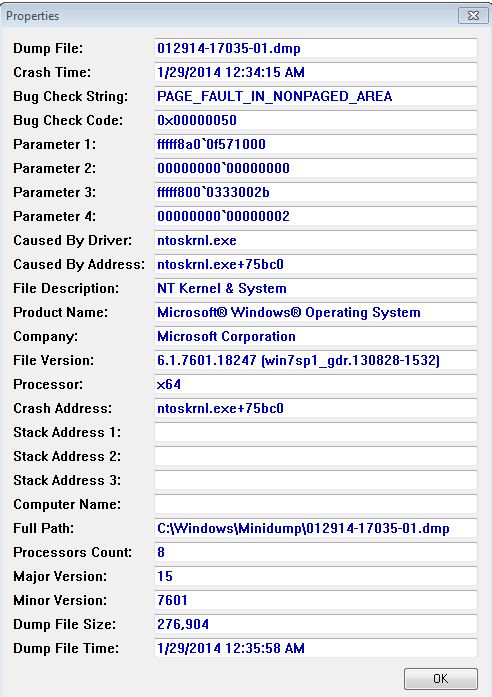
-
Wondering if there is a better application than Procmon that can help me track down BSODs that I have been suffering through? The BSODs happen either right after I have logged into computer and the W7 desktop is loading. Or sometimes when the computer is idle, it will BSOD and rebootl. I have ran diags on my memory and hard drives and they are OK. I did a little Googling and saw some people have this same problem and I tried what they did to fix the problem. Uninstall the video drivers, reboot into Safe Mode and run Guru3D - Driver Sweeper to clean out the leftovers of the uninstalled driver and then reboot back into the normal W7 OS and reinstall the video drivers. I just did that late last night and I have yet to do any testing to see if this solved my problems or not. But just in case, I am wondering if there was something easier/better than Procmon. W7 x64, fully patched 16GB RAM i7 3.4ghz 2600k processor, not overclocked and liquid cooled 2x AMD 6750 1GB GPUs (latest drivers installed) 2TB drive (OS and apps installed on there) 1TB drive with a 250GB partition dedicated to FSX only, remaining portion dedicated to my music collection
-
Except for the fact that UTT has all but admitted that they have taken others work, made some modifications to it without the consent of the original author and then released it as their own work (and even going as far as selling the source code). It is because of this that UTT is on the AVSIM Wall of Shame. http://forum.avsim.net/forum/632-the-wall-of-shame/. And it is because of this that I am not using the UTT MD-11, B748, CR9 and CR1000, I am not going to support these kinds of actions even if it does provide FSX native AI models. MD-11 was ripped off from GWAI who borrowed parts of it without consent from iFDG (I think it was their MD-11). B748 was ripped off from the AI Aardvark B747 without their consent. CRJ9/CRJ1000 was ripped off from the Posky CRJ series without their consent.
-
This might be resolved.....might be. I was using DXTBmp to look at my UPS textures, and the night texture for my AIA B767-300 looked off. I replaced it with a night texture for another B767-300GE freighter, and FSX was able to load completely without a crash. Hopefully this ordeal is resolved, I'll do more testing later.
-
I do not use an AI program, I use flightplans from Alpha India and others, all manually installed using AIFP. Since my last crash happened at KDTW on Sunday at 12:30, I am using that as my test. After moving my traffic bgl file for an airline back into the scenery folder, I am loading FSX with those settings. So far so good, no crashes yet. I am following Wikipedia's entry for KDTW to add back in the traffic, made it as far down the list as Royal Jordanian. If I get all my commercial and cargo carriers added in OK, then it might be any of my packages for general aviation. This is slow going, with the nicer weather (finally!) and playoff hockey, wanting to sit in front of my PC and work on this is not a priority.
-
I did read through the links you provided. And I just recently tried a few more things. I removed the UIAutomationCore.dll file from the FSX folder, still crashed. I uninstalled Bonjour and rebooted, still crashed. I enabled DEP and it still crashed. With every crash it was as the flight loaded and towards the end of the loading process when it said it was loading the AI traffic. So I disabled all AI traffic (plans, boats and airport vehicles) and loaded a flight and it didn't crash. So now somewhere I have a corrupt AI traffic file...and I have a long process to figure out what might be corrupt.
-
Got another crash, this time as it was loading the flight that I created. Here is the AppCrashView data. DEP is off and the .dll file is still in my FSX folder. Version=1 EventType=BEX EventTime=130128043013534469 ReportType=2 Consent=1 UploadTime=130128043015474580 ReportIdentifier=40cadd5c-bab7-11e2-918f-14dae9f54423 IntegratorReportIdentifier=40cadd5b-bab7-11e2-918f-14dae9f54423 WOW64=1 Response.BucketId=3329113149 Response.BucketTable=5 Response.type=4 Sig[0].Name=Application Name Sig[0].Value=fsx.exe Sig[1].Name=Application Version Sig[1].Value=10.0.61637.0 Sig[2].Name=Application Timestamp Sig[2].Value=46fadb14 Sig[3].Name=Fault Module Name Sig[3].Value=StackHash_ab46 Sig[4].Name=Fault Module Version Sig[4].Value=0.0.0.0 Sig[5].Name=Fault Module Timestamp Sig[5].Value=00000000 Sig[6].Name=Exception Offset Sig[6].Value=752fc9f1 Sig[7].Name=Exception Code Sig[7].Value=c0000005 Sig[8].Name=Exception Data Sig[8].Value=00000008 DynamicSig[1].Name=OS Version DynamicSig[1].Value=6.1.7601.2.1.0.256.48 DynamicSig[2].Name=Locale ID DynamicSig[2].Value=1033 DynamicSig[22].Name=Additional Information 1 DynamicSig[22].Value=ab46 DynamicSig[23].Name=Additional Information 2 DynamicSig[23].Value=ab46b3b696c4386cb918452ef6a6a6e5 DynamicSig[24].Name=Additional Information 3 DynamicSig[24].Value=3e3d DynamicSig[25].Name=Additional Information 4 DynamicSig[25].Value=3e3d69af832149c5f47c99a386ac7394 UI[2]=D:\Flight Simulator X\fsx.exe UI[3]=Microsoft Flight Simulator® has stopped working UI[4]=Windows can check online for a solution to the problem. UI[5]=Check online for a solution and close the program UI[6]=Check online for a solution later and close the program UI[7]=Close the program LoadedModule[0]=D:\Flight Simulator X\fsx.exe LoadedModule[1]=C:\Windows\SysWOW64\ntdll.dll LoadedModule[2]=C:\Windows\syswow64\kernel32.dll LoadedModule[3]=C:\Windows\syswow64\KERNELBASE.dll LoadedModule[4]=C:\Windows\WinSxS\x86_microsoft.vc80.mfc_1fc8b3b9a1e18e3b_8.0.50727.6195_none_cbf5e994470a1a8f\MFC80.DLL LoadedModule[5]=C:\Windows\WinSxS\x86_microsoft.vc80.crt_1fc8b3b9a1e18e3b_8.0.50727.6195_none_d09154e044272b9a\MSVCR80.dll LoadedModule[6]=C:\Windows\syswow64\msvcrt.dll LoadedModule[7]=C:\Windows\syswow64\GDI32.dll LoadedModule[8]=C:\Windows\syswow64\USER32.dll LoadedModule[9]=C:\Windows\syswow64\ADVAPI32.dll LoadedModule[10]=C:\Windows\SysWOW64\sechost.dll LoadedModule[11]=C:\Windows\syswow64\RPCRT4.dll LoadedModule[12]=C:\Windows\syswow64\SspiCli.dll LoadedModule[13]=C:\Windows\syswow64\CRYPTBASE.dll LoadedModule[14]=C:\Windows\syswow64\LPK.dll LoadedModule[15]=C:\Windows\syswow64\USP10.dll LoadedModule[16]=C:\Windows\syswow64\SHLWAPI.dll LoadedModule[17]=C:\Windows\syswow64\ole32.dll LoadedModule[18]=C:\Windows\system32\apphelp.dll LoadedModule[19]=C:\Windows\AppPatch\AcGenral.DLL LoadedModule[20]=C:\Windows\system32\UxTheme.dll LoadedModule[21]=C:\Windows\system32\WINMM.dll LoadedModule[22]=C:\Windows\system32\samcli.dll LoadedModule[23]=C:\Windows\syswow64\OLEAUT32.dll LoadedModule[24]=C:\Windows\system32\MSACM32.dll LoadedModule[25]=C:\Windows\system32\VERSION.dll LoadedModule[26]=C:\Windows\syswow64\SHELL32.dll LoadedModule[27]=C:\Windows\system32\sfc.dll LoadedModule[28]=C:\Windows\system32\sfc_os.DLL LoadedModule[29]=C:\Windows\system32\USERENV.dll LoadedModule[30]=C:\Windows\system32\profapi.dll LoadedModule[31]=C:\Windows\system32\dwmapi.dll LoadedModule[32]=C:\Windows\syswow64\SETUPAPI.dll LoadedModule[33]=C:\Windows\syswow64\CFGMGR32.dll LoadedModule[34]=C:\Windows\syswow64\DEVOBJ.dll LoadedModule[35]=C:\Windows\syswow64\urlmon.dll LoadedModule[36]=C:\Windows\syswow64\iertutil.dll LoadedModule[37]=C:\Windows\syswow64\WININET.dll LoadedModule[38]=C:\Windows\syswow64\Normaliz.dll LoadedModule[39]=C:\Windows\system32\MPR.dll LoadedModule[40]=C:\Windows\AppPatch\AcLayers.DLL LoadedModule[41]=C:\Windows\system32\WINSPOOL.DRV LoadedModule[42]=C:\Windows\AppPatch\AcSpecfc.DLL LoadedModule[43]=C:\Windows\WinSxS\x86_microsoft.windows.common-controls_6595b64144ccf1df_5.82.7601.17514_none_ec83dffa859149af\COMCTL32.dll LoadedModule[44]=C:\Windows\system32\mscms.dll LoadedModule[45]=C:\Windows\system32\DDRAW.dll LoadedModule[46]=C:\Windows\system32\DCIMAN32.dll LoadedModule[47]=C:\Windows\syswow64\COMDLG32.dll LoadedModule[48]=C:\Windows\syswow64\IMM32.dll LoadedModule[49]=C:\Windows\syswow64\MSCTF.dll LoadedModule[50]=C:\Windows\syswow64\WS2_32.dll LoadedModule[51]=C:\Windows\syswow64\NSI.dll LoadedModule[52]=C:\Windows\system32\msi.dll LoadedModule[53]=C:\Windows\WinSxS\x86_microsoft.vc80.mfcloc_1fc8b3b9a1e18e3b_8.0.50727.6195_none_03ce2c72205943d3\MFC80ENU.DLL LoadedModule[54]=D:\Flight Simulator X\language.dll LoadedModule[55]=D:\Flight Simulator X\API.DLL LoadedModule[56]=C:\Windows\WinSxS\x86_microsoft.vc80.crt_1fc8b3b9a1e18e3b_8.0.50727.6195_none_d09154e044272b9a\MSVCP80.dll LoadedModule[57]=D:\Flight Simulator X\ablscpt.dll LoadedModule[58]=D:\Flight Simulator X\flight.dll LoadedModule[59]=D:\Flight Simulator X\ai_player.dll LoadedModule[60]=D:\Flight Simulator X\acontain.dll LoadedModule[61]=D:\Flight Simulator X\controls.dll LoadedModule[62]=C:\Windows\system32\DINPUT8.dll LoadedModule[63]=D:\Flight Simulator X\fsui.dll LoadedModule[64]=D:\Flight Simulator X\atc.dll LoadedModule[65]=D:\Flight Simulator X\facilities.dll LoadedModule[66]=D:\Flight Simulator X\demo.dll LoadedModule[67]=D:\Flight Simulator X\main.dll LoadedModule[68]=D:\Flight Simulator X\fe.dll LoadedModule[69]=D:\Flight Simulator X\util.dll LoadedModule[70]=D:\Flight Simulator X\simprop.dll LoadedModule[71]=D:\Flight Simulator X\g2d.dll LoadedModule[72]=C:\Windows\system32\d3dx9_34.dll LoadedModule[73]=C:\Windows\system32\d3dx10_34.dll LoadedModule[74]=C:\Windows\system32\d3d9.dll LoadedModule[75]=C:\Windows\system32\d3d8thk.dll LoadedModule[76]=D:\Flight Simulator X\g3d.dll LoadedModule[77]=D:\Flight Simulator X\panels.dll LoadedModule[78]=D:\Flight Simulator X\multiplayer.dll LoadedModule[79]=D:\Flight Simulator X\ui.dll LoadedModule[80]=D:\Flight Simulator X\sound.dll LoadedModule[81]=D:\Flight Simulator X\sim1.dll LoadedModule[82]=D:\Flight Simulator X\simscheduler.dll LoadedModule[83]=D:\Flight Simulator X\visualfx.dll LoadedModule[84]=D:\Flight Simulator X\window.dll LoadedModule[85]=D:\Flight Simulator X\terrain.dll LoadedModule[86]=D:\Flight Simulator X\weather.dll LoadedModule[87]=C:\Windows\system32\DSOUND.dll LoadedModule[88]=C:\Windows\system32\POWRPROF.dll LoadedModule[89]=D:\Flight Simulator X\symmap.dll LoadedModule[90]=C:\Windows\WinSxS\x86_microsoft.windows.gdiplus_6595b64144ccf1df_1.1.7601.17825_none_72d273598668a06b\gdiplus.dll LoadedModule[91]=C:\Windows\system32\MSIMG32.dll LoadedModule[92]=D:\Flight Simulator X\xuipc.dll LoadedModule[93]=D:\Flight Simulator X\livingwater.dll LoadedModule[94]=D:\Flight Simulator X\fs-traffic.dll LoadedModule[95]=D:\Flight Simulator X\gps.dll LoadedModule[96]=C:\Windows\system32\MSWSOCK.dll LoadedModule[97]=C:\Windows\system32\SHFOLDER.dll LoadedModule[98]=C:\Windows\system32\CRYPTSP.dll LoadedModule[99]=C:\Windows\system32\rsaenh.dll LoadedModule[100]=C:\Windows\syswow64\WINTRUST.dll LoadedModule[101]=C:\Windows\syswow64\CRYPT32.dll LoadedModule[102]=C:\Windows\syswow64\MSASN1.dll LoadedModule[103]=C:\Windows\syswow64\CLBCatQ.DLL LoadedModule[104]=C:\Windows\system32\wbem\wbemprox.dll LoadedModule[105]=C:\Windows\system32\wbemcomn.dll LoadedModule[106]=C:\Windows\system32\RpcRtRemote.dll LoadedModule[107]=C:\Windows\system32\wbem\wbemsvc.dll LoadedModule[108]=C:\Windows\system32\wbem\fastprox.dll LoadedModule[109]=C:\Windows\system32\NTDSAPI.dll LoadedModule[110]=C:\Windows\WinSxS\x86_microsoft.msxml2_6bd6b9abf345378f_4.20.9876.0_none_b7e610287b2b4ea5\MSXML4.DLL LoadedModule[111]=C:\Windows\system32\dxgi.dll LoadedModule[112]=C:\Windows\system32\d3d11.dll LoadedModule[113]=C:\Windows\system32\aticfx32.dll LoadedModule[114]=C:\Windows\system32\atiu9pag.dll LoadedModule[115]=C:\Windows\system32\atiumdag.dll LoadedModule[116]=C:\Windows\system32\atiumdva.dll LoadedModule[117]=C:\Windows\system32\atiuxpag.dll LoadedModule[118]=C:\Windows\system32\D3DCompiler_34.dll LoadedModule[119]=C:\Windows\system32\WindowsCodecs.dll LoadedModule[120]=C:\Windows\system32\d3d10_1.dll LoadedModule[121]=C:\Windows\system32\d3d10_1core.dll LoadedModule[122]=C:\Windows\SysWOW64\dxdiagn.dll LoadedModule[123]=C:\Windows\SysWOW64\d3d10.dll LoadedModule[124]=C:\Windows\SysWOW64\d3d10core.dll LoadedModule[125]=C:\Windows\system32\winbrand.dll LoadedModule[126]=C:\Windows\system32\WTSAPI32.DLL LoadedModule[127]=C:\Windows\system32\WINSTA.dll LoadedModule[128]=C:\Windows\SysWOW64\gameux.dll LoadedModule[129]=C:\Windows\WinSxS\x86_microsoft.windows.common-controls_6595b64144ccf1df_6.0.7601.17514_none_41e6975e2bd6f2b2\COMCTL32.dll LoadedModule[130]=C:\Windows\SysWOW64\XmlLite.dll LoadedModule[131]=C:\Windows\SysWOW64\wer.dll LoadedModule[132]=C:\Windows\System32\Wpc.dll LoadedModule[133]=C:\Windows\System32\wevtapi.dll LoadedModule[134]=C:\Windows\System32\msxml6.dll LoadedModule[135]=C:\Windows\system32\SAMLIB.dll LoadedModule[136]=C:\Windows\system32\netutils.dll LoadedModule[137]=D:\Flight Simulator X\uiautomationcore.dll LoadedModule[138]=C:\Windows\system32\OLEACC.dll LoadedModule[139]=C:\Windows\System32\MMDevApi.dll LoadedModule[140]=C:\Windows\System32\PROPSYS.dll LoadedModule[141]=C:\Windows\system32\AUDIOSES.DLL LoadedModule[142]=C:\Windows\system32\RICHED20.DLL LoadedModule[143]=C:\Windows\system32\HID.DLL LoadedModule[144]=C:\Windows\system32\XInput9_1_0.dll LoadedModule[145]=C:\Windows\system32\wdmaud.drv LoadedModule[146]=C:\Windows\system32\ksuser.dll LoadedModule[147]=C:\Windows\system32\AVRT.dll LoadedModule[148]=C:\Windows\system32\msacm32.drv LoadedModule[149]=C:\Windows\system32\midimap.dll LoadedModule[150]=C:\Windows\system32\dinput.DLL LoadedModule[151]=C:\Windows\System32\wship6.dll LoadedModule[152]=C:\Windows\System32\wshtcpip.dll LoadedModule[153]=D:\Flight Simulator X\bglmanx.dll LoadedModule[154]=C:\Windows\syswow64\PSAPI.DLL LoadedModule[155]=C:\Windows\WinSxS\x86_microsoft.flightsimulator.simconnect_67c7c14424d61b5b_10.0.61259.0_none_55f5ecdc14f60568\SimConnect.dll LoadedModule[156]=C:\Windows\system32\inetmib1.dll LoadedModule[157]=C:\Windows\system32\IPHLPAPI.DLL LoadedModule[158]=C:\Windows\system32\WINNSI.DLL LoadedModule[159]=C:\Windows\system32\snmpapi.dll LoadedModule[160]=D:\Flight Simulator X\Modules\FSUIPC4.dll LoadedModule[161]=C:\Windows\SysWOW64\ieframe.dll LoadedModule[162]=C:\Windows\system32\Secur32.dll LoadedModule[163]=C:\Windows\system32\dnsapi.DLL LoadedModule[164]=C:\Windows\SysWOW64\mshtml.dll LoadedModule[165]=C:\Windows\system32\msimtf.dll LoadedModule[166]=C:\Windows\system32\msls31.dll LoadedModule[167]=C:\Windows\system32\d2d1.dll LoadedModule[168]=C:\Windows\system32\DWrite.dll LoadedModule[169]=C:\Windows\system32\D3D10Warp.dll LoadedModule[170]=C:\Windows\system32\MLANG.dll LoadedModule[171]=C:\Windows\system32\ntmarta.dll LoadedModule[172]=C:\Windows\syswow64\WLDAP32.dll LoadedModule[173]=C:\Windows\system32\msadp32.acm LoadedModule[174]=C:\Windows\system32\RASAPI32.dll LoadedModule[175]=C:\Windows\system32\rasman.dll LoadedModule[176]=C:\Windows\system32\rtutils.dll LoadedModule[177]=C:\Windows\system32\sensapi.dll LoadedModule[178]=C:\Windows\system32\NLAapi.dll LoadedModule[179]=C:\Windows\system32\rasadhlp.dll LoadedModule[180]=C:\Program Files (x86)\Bonjour\mdnsNSP.dll LoadedModule[181]=C:\Windows\System32\fwpuclnt.dll LoadedModule[182]=C:\Program Files (x86)\Common Files\microsoft shared\ink\tiptsf.dll LoadedModule[183]=C:\Windows\system32\NetworkExplorer.dll LoadedModule[184]=C:\Windows\system32\EhStorShell.dll LoadedModule[185]=C:\Windows\system32\ntshrui.dll LoadedModule[186]=C:\Windows\system32\srvcli.dll LoadedModule[187]=C:\Windows\system32\cscapi.dll LoadedModule[188]=C:\Windows\system32\slc.dll LoadedModule[189]=C:\Windows\System32\StructuredQuery.dll LoadedModule[190]=C:\Windows\SysWOW64\actxprxy.dll LoadedModule[191]=C:\Program Files (x86)\Internet Explorer\ieproxy.dll LoadedModule[192]=C:\Windows\SysWOW64\thumbcache.dll LoadedModule[193]=C:\Windows\system32\SearchFolder.dll LoadedModule[194]=C:\Windows\system32\SHDOCVW.dll State[0].Key=Transport.DoneStage1 State[0].Value=1 FriendlyEventName=Stopped working ConsentKey=BEX AppName=Microsoft Flight Simulator® AppPath=D:\Flight Simulator X\fsx.exe
-
@firehawk44 Thanks for the info, I will look into it. Last night as I watched the Chicago Blackhawks playoff hockey game, I loaded up FSX and flew a short flight from KEVV to KDTW and had no CTDs. So that is good news, I am happy that my sim is not completely ruined and I can fly it. Hopefully the info in your post will help out more.
-
Well, still crashing even after verifying the correct .DLL file is in the FSX folder and fixing all of my texture issues. Was on a short 200 or so mile flight last night between KEVV-KORD and as soon as I got landing clearance into KORD, it crashed to desktop with the same error message that I provided in the original post. I'll try another flight, to another airport. Maybe FS Dreamteam KORD is causing the problem, however when I flew out of there a few weeks ago (my last good flight), I had no issues at all.
-
I do not have those installed. That is the version of the UAAutomationCore.dll file that I have in my FSX folder. Also I did not have FSUIPC installed, so I installed it. Last night I finished fixing my textures that had missing or corrupt Alpha textures. There were a lot of them. Was too late to try to fly last night, so I'll give it another shot to see if that fixed it.
-
Yeah I meant copying the .dll file into my FSX folder, sorry. The other UIAutomationCore.dll on my system have not been touched. I have run a scan on my FSX folder using FS AI Texture Checker from Erez Werber, the creator of the FAIB B737 models, and have found quite a few errors with textures in the wrong format, which surprised me. I am cleaning up the textures now and will try another flight after I finish.
-
I just recently started using FSX, despite the fact that I have owned it for years. I have the Gold Edition that includes the Deluxe Edition and the Acceleration Pack. I have only made one flight and since then, FSX will crash at random points. And with every crash, it is recording the following in the Event Viewer, but there is nothing there to go on to give clues why it is crashing. Log Name: Application Source: Application Error Date: 5/5/2013 11:54:21 AM Event ID: 1000 Task Category: (100) Level: Error Keywords: Classic User: N/A Computer: Craig Description: Faulting application name: fsx.exe, version: 10.0.61637.0, time stamp: 0x46fadb14 Faulting module name: unknown, version: 0.0.0.0, time stamp: 0x00000000 Exception code: 0xc0000005 Fault offset: 0x752fc9f1 Faulting process id: 0x17e8 Faulting application start time: 0x01ce49aebc13f680 Faulting application path: D:\Flight Simulator X\fsx.exe Faulting module path: unknown Report Id: 6e3ea058-b5a4-11e2-918f-14dae9f54423 I have read various posts but nothing has helped so far. My .cfg file has the HIGHMEMFIX=1 entry, I have replaced the UIAutomationCore.dll file. Other than my AI models and textures and associated flightplans, the only other addon is FSDreamteam KORD for FSX, which I downloaded from their site. Crashes appear at random points, not at ORD though. When I pushback from the gate, during taxi, in flight and so on. The last crash happend as I was holding short waiting for traffic to land. I do have a couple of addon freeware aircraft (Posky E145 and CR7) installed, but the crashes will happen with the default aircraft as well as the two Posky models. FSX will just say it was not responding and crash to the desktop. I know the Event Viewer log is not much to go on, but has anybody come across that before? 3.4GHz Intel i7 CPU Win7 64bit 16GB RAM 2 AMD Radeon HD 6700 cards with 1GB RAM each FSX is installed onto it's own partition on a 2nd hard drive. Nothing is overclocked, either CPU or GPUs.
-
Is there an alternate FDE for the Samdim An-72? The one that comes with the aircraft seems to have problems. The plane almost seems to want to tip over when turning during taxi and at cruise altitude it onlt seems to get to about M0.42.
-
An issue with our provider. Can provide more info later when available.
-
Does anybody know if the ReadyBoost feature will make a difference with FS9 under Windows 7?
-
Fixed my problem and if a mod wants to move this to the Windows 7 forum, that would be great.What I had to do to fix this was to right click on the shortcut and choose run as administrator, even though my account already had administrator access. After doing this, Flight Environment was able to load the textures into FS2004.
-
I just upgraded my FS2004 PC to Windows 7 64 bit version and have been reinstalling FS and all of my addons. I installed Flight Environment. I ran the program and selected the textures that I wanted and when I tried to save/apply them, the program froze and wouldn't install the new textures. Has anybody else seen this and know how to get around this?
-
Anybody know if there is a Posky CRJ-700v3 in the house livery? I didn't see one on the Posky site and I couldn't find one in the AVSIM library last time it was up. I have one for their CRJ-900 and I think that there isn't one for the CRJ-200. I often prefer flying in the house livery if possible and if I cannot find one, I try to find a good bizjet paint to use.
-
I tried looking through the file library but couldn't find one. Anybody know if there is a repaint for the Project Airbus A319IAE in house colors? I also tried looking on the Project Airbus website, but it appears to be offline.
-
But there lies the fault. The people that develop the models, textures and flight plans (me...sometimes) release it as freeware and WOAI uses these releases with author permission, which going back to SKAI, does not.
-
Thanks for the info. I agree, this is a very good model and great to fly! Just added in the shockwave light settings for it and it looks better. Now I just need to add in some engine smoke.
-
Is there a fix/update for the Vistaliners/Kittyhawk B732 that makes the engines spin? Looks somewhat unrealistic to see them not spinning while the engines are on.

