Skip to content
View in the app

A better way to browse. Learn more.

The AVSIM Community

A full-screen app on your home screen with push notifications, badges and more.

To install this app on iOS and iPadOS
  1. Tap the Share icon in Safari
  2. Scroll the menu and tap Add to Home Screen.
  3. Tap Add in the top-right corner.
To install this app on Android
  1. Tap the 3-dot menu (⋮) in the top-right corner of the browser.
  2. Tap Add to Home screen or Install app.
  3. Confirm by tapping Install.

couldabin

Members
  • Joined

  • Last visited

Everything posted by couldabin

  1. Jeff Thankls so much for this prompt reply. Following your suggestion, I deleted the FSX.cfg file and relaunched FSX with success. A bit of tweaking to do to get it back how it was but at least I can now fly. Apologies for not falling in line with Forum policies...couldabin
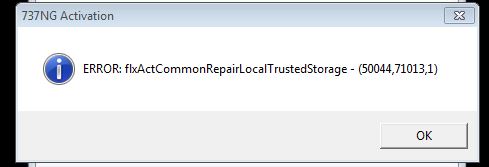
  2. For years I have enjoyed the immersive experience of FSX and PMDG's 737 NGX. Today, I have launched FSX as normal (it opens with a PMDG aircraft loaded) and for the first time ever, I have been asked for a PMDG product activation code. I dug this out and applied it and in return, got the response in the attached screen grab. FSX will not load after this sequence of events. Can anyone help me with a workaround?
Account

Navigation

Search

Search

Configure browser push notifications

Chrome (Android)
  1. Tap the lock icon next to the address bar.
  2. Tap Permissions → Notifications.
  3. Adjust your preference.
Chrome (Desktop)
  1. Click the padlock icon in the address bar.
  2. Select Site settings.
  3. Find Notifications and adjust your preference.