


cj3737
Members
-
Joined
-
Last visited
Everything posted by cj3737
-
I got it... I just had to reload the EZDok config then restart FSX...
-
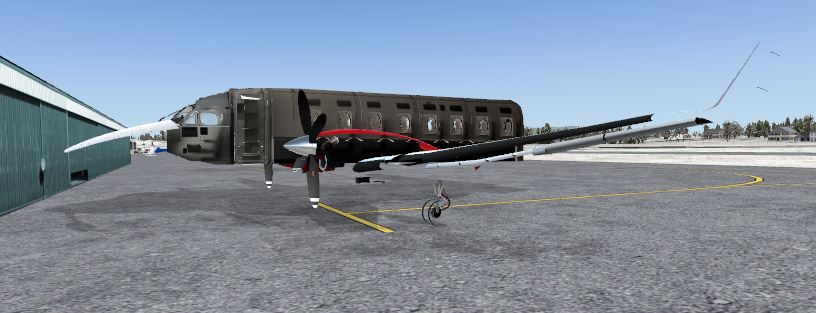
Hey guys!! Just got the 1900 and was trying to set up my EZDok but when I try to set the Aircraft views, It shows the skeleton of the plane and the red annotation in the upper right corner of sim says im still in VC.. All VC views are set and work properly but when I try to go outside to do my walk around, I dont have the external graphics... Just 1 wheel and half the plane with no skin.... I loaded another operational aircraft and the external views work fine and the red annotation says EZDok Aircraft Universal View.. Anyone else having an issue like this? Ive tried loading other saved CAM sets but I still get the same skeleton view when I switch views. Also when I loaded it up the 1st time, It didnt give me any presets for the A/C model like it would if I loaded a default plane. It does recognize its a 1900d but thats about it..
-
-
-
-
Thanks guys...Glad Im not the only one Just thought of something else... When I try to load a J41 saved flight in P3d, it always loads with the engines starting up.. any ideas how to bypass this?
-
I got everything working up to the HSI no telling any info... The Fonts pack took care of that... I keep getting this... Any ideas?
-
I asked this question over in the P3D forum but got the stereotypical "we cant answer that because we do not support 3rd party addons" blah blah blah.... Hopefully someone can tell me the answer to this... During install of a certain addon ( we'll just use XXXX as an example)... The auto installer brings up the main install page then directs you to where you want to install the files... ...program files x86/microsoft games/FSX and so on... Are the installs the same into P3D? but located in the x86/lockheedmartin folder? I guess Im asking if you just change the directory to the lockheed folder, will it install with no hang ups or do you have to have an active copy of FSX and transfer all the files into the corresponding folders... I can see this sounding more complex than it should be and I apologize... I just dont understand the process of loading add ons into P3D Thanks!!!!!
-
Figured out what it was... on the NAV page of the FMS, if the FR line say invalid, the acft will fly whatever it wants... you have to double click enter so the FMS knows where to track from.. then your next waypoint will be in the TO line and the NAV will follow the input flightplan
-
IT seems to want to track to the next waypoint but continues past the intercept heading and back towards an imaginary point... I had an idea that I havent had a chance to try yet.. I know the default aircraft flight setup has been known the throw things off in this plane so my idea is, making sure the default plabe has the GPS/NAV selector to GPS then save the default. Load up my J41 and flight the way I would and see if that has anything to do with it... Might work, might not but it is a legit idea....
-
First waypoint is starting airport... The next (direct to) waypoint is about 60 miles out CZST-PUITY-WETOL-PAKT Trying to get the FMS to fly me direct to PUITY. The 2 waypoints are part of an ILS approach.. Would that be the problem?
-
Waypoints put into FMS...All the other inputs are correct as well (Weight, fuel, VNAV etc) Take off, get to stable climb then push direct to next waypoint. Push nav button/ap button and acft starts to turn.. Passes intercept point and seems to head back to initial start point... Any ideas on what Im doing wrong? It has worked before...
-
Ive heard some muttering about 2.0... Anyone know of a release date?
-
Cruzin along at 17500 the landing gear inadvertently drops... Hands off yoke/keyboard/mouse... autopilot on... just sitting there watching the clouds go by and the gear starts to come down. I have it hot keyed to a switch on the yoke and deleted the default "G" command but it still drops sometimes... I did just do a fresh install of FSX and all its millions of parts... Any Ideas?
-
I only have the unregistered version right now... I do have multiple keys to actuate the propeller axis but I messed around with them and doesnt seem to matter how many keys I use for any of it.. It still automatically snaps back to cutoff. However, Ive moved it about half way up the slide just until the CP says "condition levers taxi" and that seems to keep them from slamming backward. Guess this plane will be the same as all of them.. bad things happen until I figger out the tricks to make them run right.. That makes sense so I tried it but it didnt seem to help...
-
Update... When I transfer my prop lever from taxi to flight on my throttle quad(saitek) it snaps the lever to feather shut off... I recalibrated everything but it still does it... any ideas?
-
So lemme get this straight... If the default 172 has the selector on left then it will let the engines die? How about it there is fuel in both tanks? Doesnt make a whole lot of sense that a payware product would have glitches like this... Did exactly like you suggested and Just tried to run it again and they both shut down when I tried to transfer the props to takeoff...
-
It usually happens when im transitioning my throttles or my rpm... Im not slamming it in any direction... using a nice easy, slow push or pull on the throttles. Most recently it has been on the transition from idle to flight on the prop pitch. Sometimes they shut off mid flight, sometimes at the gate, sometimes on taxi to or from the parking spot. I watch my engine gauges closely and ensure I dont exceed max limits. I thought it may be something to do with icing conditions but I actuallu had both engines catch fire right after they shut off...egt temps were well below max. Ive even had shut down issues when shutting off the icing switches mid flight Has anyone else had these problems? Sometimes I get very uneventful flight but most of them have been rediculous I also read in the tutorial that the FSX modelled turboprops are not right and this plane has some fits with this issue... any truth to that? Help is always welcome!!
-
I would like to announce the creation of Era Virtual Airways. We are an airline built specifically for the flight sim enthusiast who wants to get as much realism out of the flight sim experience as possible. We currently operate 7 different airlines with everything from low level bush flying to high level IFR flights. All of our parent airlines are aware of our presence and we have their full support in our endeavours. We are looking for quite a few more highly dedicated, enthusiastic pilots to add to our current roster of 10. There are over 400 flyable routes with a good amount of scenarios on the horizon. The Board of Directors at Era Virtual Airways strives to keep our VA “as real as it gets” so if it happens in real life, it happens here. We understand life gets in the way of our hobbies so we don’t pressure you to make a certain amount of flights every month. We have incorporated such programs as VAFS5, TeamSpeak3, VAFS multiplayer, Flight Sim Commander, and VatSim. If you are looking for an experience unlike any other operational virtual airline, be sure to check us out!!! www.eravirtualairways.com See you in the skies!!! Chris Wetzel COO – Era Virtual Airways www.eravirtualairways.com

