


vybhav
Members
-
Joined
-
Last visited
Everything posted by vybhav
-
Hello Jim I removed Uiautomationcore.dll and the sim started crashing almost every 10 minutes, Now I have replaced another version of Uiautmoationcore.dll and also ran repair of FSX. The crashing continues. Almost 8 - 10 crashes in the last 8 hours. I am appending below a few crash reports with various reasons for fault. Not sure what I should be doing. Any guidance. ==== === ===== ==== Regards Vybhava Srinivasan
-
Many thanks for your support Jim a) I have deleted the UIautomationcore file, l will check and see what happens b) On the settings all of them are now average, i have reduced the settings by more than 30%, in the last two days to see if that would help c) I do not have any antivirus installed now or when FSX was being installed. I will try repairing FSX installation. But if I do that will it have any impact on the already installed Add-ons ( I have so many many addons installed :( ) Looking forward to your response. Regards Vybhav
-
My Sim has been repeatedly crashing with MSVCR80.dll and API.DLL faults, Any thoughts on what i can do. Tried toning down the settings, all C++ and VC files seem to be current. Not Sure how to proceed. I am pasting below the last three crash reports ==== ==== Version=1 Regards Vybhava Srinivasan
-
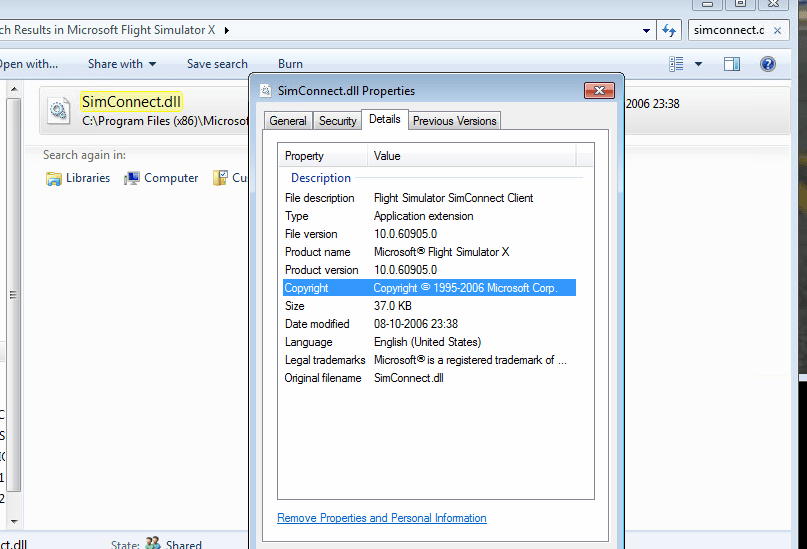
Hello All, I looked at simconnect.dll in main FSX folder, I could find only one file with version 10.0.60905, see screenshot. So not sure what to do, Today I had two more crashes with different reasons. See log below. Not sure what to do.... Looking forward to your inputs. ===================
-
My FSX has been crashing almost once or twice everyday. My analysis of the app crash log indicates different reasons. I tried to tone down the settings significantly but the crash still occurs. Could you please help by looking at the log.? I am appending the last three crash logs ==================== ======
-
Thanks for the reply. I will try your suggestions and revert.
-
Hello My computer is I7 - 4970K (4.4GHZ) with GTX 780. I have been struggling suddenly with the system. In fact even the system was struggling with frame rates with substantially average settings on the sliders. Finally I installed FSX Boosters and the frames seems to be better. I am not sure what I am doing wrong but anyway, the bigger problem is for some reason FSX keeps crashing. I am appending few crash reports would be nice if you could help: == === ====== =====
-
Sorry i could not update you. Jim as per your suggestion I installed process monitor and noticed there was a crash every time log.bin file was being loaded. Hence I deleted the log file and then FSX worked normally. Now not sure how the log file got corrupted but glad I got the issue resolved, thanks to your help. Regards Vybhav
-
Thanks for talking time in giving this detailed guidance. Let me try this tomorrow and will keep you updated.
-
Thanks for the response Jim. So what happens is the FSX screen appears and remains like that with the screen, it does not move to the next screen where we choose the aircraft, location, etc., Then it shows the program is not responding. When I hit CTRL+ALT+DEL against FSX shows not responding too.
-
Thanks so much as always. I followed all the steps above, including deleting the fsx.cfg again. It simply would not start. This is the error i get.
-
Hello Since this morning my FSX simply refuses to start. I tried deleting the fsx.cfg and try again but still the same. I am appending below two logs that were generated. Any clue what i should be doing
-
Thank you for the update
-
This seems to be happening quite regularly where FSX crashes on final. The log is below, could anyone locate the problem =======
-
Recently have been seeing behave strangely, not sure what the problem is, i am appending below the latest crash report. Could you guy see any reason
-
Jim Firstly thanks for the new article on CTD. I plan to read this over the weekend. I have been trying my luck on the crash with no particular luck and then restored all my settings to normal and had no crash for last 5 days, until today had a crash, the dump is below. Could you help by reviewing this and seeing if there is anything that can be connected to the above crashes.
-
Hey Jim, I have many add-ons installed. Wondering how do i figure out which scenery. Re-installing FSX and all the add-ons again is going to be something i would like to do as a last resort. :(
-
How do i approach the problem, given i fly using the FSX stock 737 aircraft and have no traffic enabled.
-
Thanks for your update Jim I still did not find AES in scenery library our any other options. Not sure how to deal with this. I use the sim on three large lcd screens. I removed the UI Automation Core and the File Version is 6.0.6001.18000. Unfortunately, the sim again crashed and the dump is below: Yes I do use IRST, but not sure if that is again creating the problem. Regards
-
Hello Jim, I re-installed the Visual Basic software but could not find AES VistaMare in the scenery library. It again crashed and the report is below. I haven't still removed the Uiautomationcore.dll, which probably will try now. In the meantime would you be able to see something from the below crash log:
-
Thanks a ton Jim. Strangely you had indicated even last time that i needed to install the files which I did. I will try a shot again. I had two crashes today too. Could you make out anything in common in all these crash and what i could do to arrest them Crash 1 Crash 2
-
Hello Friends In the last four days I have been having atleast one fatal error crash of FSX. Not sure what is wrong now. I am appending below, two crash logs. Could you guys help ======= Thanks in advance
-
Hello Recently my FSX has been crashing atleast once in 2 days. I am appending below atleast 2 - 3 crash reports:
-
Hello Jim and others I have been experiencing Blue Screens from by other FSX computer. I am not sure if it is a hardware problem and if it is which hardware. Could you guys help Regards Vybhav
-
perfect thanks, will let you know the result
