November 23, 20178 yr Hi Folks, I am simply compelled to post regarding integrating the GTN into a VC. I thought I would only use my GTN in the Turbine Duke. However, I LOVE Citations, so with much trepidation downloaded again the Carenado V2 and installed into P3Dv4. The ability to seamlessly integrate the GTN into the panel is something to behold. Simply incredible - easy, simple and faultless. I also learned about the use of the "popright" selection in the RealityXP.GTN config file, courtesy of previous postings by RyanATC - why didn't I use this function before??? Anyway, Jean-Luc, just a simple "Thank you". This is truly an outstanding product. David David Porrett
November 24, 20178 yr Hi David, Thank you for your warm and kind words! But let me thank you, and all our customers, for the outstanding welcome and feedback. Our products reflect your passion and we try harder everyday sharing it and implementing most of your suggestions. We'll certainly try our best and continue to please you even more with the series of upcoming Reality XP products! Speaking of which, there are products we've already announced: the Reality XP Garmin G600/500 for FltSim and X-Plane. Believe me, this is only the tip of the iceberg, there are surprises I'm so eager to share but just can't for now!
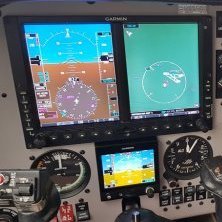
November 24, 20178 yr Author I'm sure it will look as good as this (they're my knobbly knees under the panel and yoke!) David Porrett
November 25, 20178 yr Ooooh, I'm jelly David - is that a Mooney by chance? I'd LOVE to have a G600+GTN750 in the Alabeo Mooney Ovation with 3D cockpit modelling (could take some work hehe) | My Liveries | FAA ZMP | PPL ASEL | | Windows 11 | MSI Z690 Tomahawk | 12700K 4.7GHz | MSI RTX 4080 | 64GB 6000 MHz DDR5 | 500GB Samsung 860 Evo SSD | 2x 2TB Samsung 970 Evo M.2 | EVGA 850W Gold | Corsair 5000X | HP G2 (VR) / LG 27" 1440p |
November 25, 20178 yr Author 1 hour ago, ryanbatcund said: Ooooh, I'm jelly David - is that a Mooney by chance? I'd LOVE to have a G600+GTN750 in the Alabeo Mooney Ovation with 3D cockpit modelling (could take some work hehe) Yep, M20M Bravo. You can follow VH-TLS on Flightaware (The "knobbly knees" were because it was a hot day on the ground at YMMB, but nice and cool at FL180 LOL!) David Porrett
November 27, 20178 yr Author 11 hours ago, RXP said: This is a great looking panel! I won't comment on the knees LOL! David Porrett


Archived
This topic is now archived and is closed to further replies.