


dho112
Members
-
Joined
-
Last visited
-
I know things like opinions about a UI can be very subjective, and yet their seems to be a heavy leaning toward the negative about Win10. I'm curious about what the initial reactions to Win7 were, and if they were historically similar? For me, wether Win10 and Dx12 is "the future" is a more troubling issue because a FSX install is not anything close to resembling an easy process for me, or the majority of others here who I assume use MANY third party applications with FSX as well; A complex installation instance that I think no one will argue is a very delicate balance that is especially sensitive to even minor changes in the operating system. I don't feel like 0-1 FPS performance increase "maybe" outweighs, "It works perfectly and is stable, now and for the next 5 years" If the performance increase was a confirmed 5-6 FPS, that would be a different story. I realize the change is inevitable, and it will bring certain significant improvements along with the flight sim and gaming communities ideas of "bad", but as is my traditional MO, I won't even look sideways at a new MS operating system until after at least Service Pack 1 Particularly when the change is barely evolutionary, rather than anything resembling revolutionary (despite the marketing hype)
-
Tried it with Sound Quality set to 1, then with Ultimate traffic 2 off, then with ASN off, Then with all of them off, no change, momentary freezes. Once they start, they occur at what seems almost exactly 2 min 30 sec intervals and when it freezes it lasts about 3 seconds. Oh well... Here's to hoping that the changes in SP1 will do something to help even though I don't think this issue was ever officially acknowledged as a bug? Till then 777 grounded like a 787... but NGX flies flawlessly
-
I'm going to try a few more tests right now with ASN not running and then with UT2 turned off and see what that does. I'm hesitant to run in DX9 because it took a few weeks to tweak it to get it running right and I'm afraid that if I go back to DX9 and then back to 10 I'll upset the mojo and have to hunt down some more things LoL! Addendum... Actually I'm going to try that sound quality change from 2 to 1 in the config file first to see if that does anything since its a simple change
-
Hi VLJ, I was in a rush to finish my post because I had a 3pm appointment to get to, so I wasn't able to put all the detail into my description, but I have the latest version of FSUIPC 3.93 I think? and I double and triple checked that the save feature was not checked. The really strange thing is that when I first installed the T777 I don't remember it having the freezes (it did stutter though noticeably) but it definitely freezes now. I also run all SSD drives and one of the things I was thinking is some kind of disk activity was causing the freeze, but at the times it happens, there is no disk activity (or at least the disk activity light is not on) I've even tried to set my CPU back down to 3.33Mhz (default speed) and eliminated any vestiges of overclocking completely but even that didn't ahve an effect. It's kind of maddening actually and I'm wondering if in an ironic twist, its something that plagues only the fastest machines while leaving the less fast machines alone Kind of in the same way that the top athletes can often be more susceptible to colds and flu compared to just average Joes
-
I've run about a dozen sessions to test this, just to make sure its repeatable. I'm not sure it helps anything but it might reduce a variable or two. I run a sequence where I start at the same gate at the same airport KLAX, same time of day (historic weather for ASN), I load the same flight plan, run thru the startup procedure and taxi to the active. Ultimate Traffic 2 is set to 75% traffic. First with the 737-800 NGX and then with the T777. I run an Intel I7-980x extreme overclocked to 4.5 Mhz with 12gig of DDR1600 and it is stable for countless hours running Prime. Video card is NVidia 590 GTX (2x580 GTX) I run FSX at 2560x1440 with all settings at max with DX10 except water is 2.0 low. At KLAX I average 25-30FPS limited to 30FPS with Nvidia inspector. With the NGX I have NO freezes or stutters, with the T777 using the same taxiways and weather and location and settings I get stutters and a freeze of about 3-4 seconds every 2 minutes plus or minus a few seconds. To recap. WIth NGX no stutters no freezes (doing anything and flying everywhere actually) and with the T777 I get the freeze every 2-3 minutes all the time. I don't think this proves anything conclusively that T777 causes the freeze, but it is repeatable (for me) constantly, and maybe its just that a third party program "reacts" to the presence of T777 differently, not that the T777 is actually "causing" it...
-
If it were me, I think I would have gone the April Fools route by saying that 3d modelled flight attendants were being added to the aircraft and that we could choose their measurements and hair and eye color via a new LSK choice on the FMC, and have the drill down choices like Flight Attendant 1: 1/12 <-- Female <-- Male <-- Single <-- Married <-- 35 <-- 24 <-- 33
-
Kind of a stinging April Fool 's joke I think if SP1 was on the books already, a lot more people would be laughing and laughing harder Right now I think I hear a lot more nervous, hesitant laughter Still, this isn't nearly as bad as the joke where a coworker changed the numbers on the lotto posting on the breakroom bulletin board to match the numbers of another coworkers lottery ticket he kept on his desk, and then waited all day until he told him. That was bad. I would have swung at someone for that
-
I think you might be in exactly the same phase in your FSX level of experience before I started using ground instructions and following the taxiway signs and ditched the progressive taxi command. I think that the progressive taxi feature in FSX is a cheat that makes one complacent and not realize that yes, getting to the right runway by the proper route can actually be part of the fun, immersiveness, and actually a skill that getting comfortable with may actually translate into real world awareness one day Once you understand the nomenclature of the signs, they are easy to read. I find that if I get confused at a taxiway intersection, I'll just slow to a crawl, or stop, and use the zoom to look at signs farther out and to my left and right and get my bearings or validate my position. Using my ipad and an airport chart makes things even simpler, and the most powerful tool of all? Being very familiar with the airport I fly out of LAX, SFO, JFK, and ATL very often, and those airports are so familiar to me that I can very often be at a particular gate, Have ground tell me to taxi to the active runway and I can recite the route to get there in my head and visualize what it looks like before ground says it. It's just like you knowing your neighborhood streets like the back of your hand and being able to drive to your local supermarket with you eyes closed Once you get confident that airports are typically clearly marked for taxiways, and how to read them, you can make your way about even unfamiliar airports relatively easily, and use the airport chart if you get lost instead of the progressive taxi cheat... If its any consolation, I was listening to LiveATC.net and a ground controller was talking to another pilot about how a southwest jet pilot aouldn't find his gate, was hopelessly lost, and "All screwed up" so it can happen to anyone I guess
-
I have no experience in the care and maintenance of any kind of aircraft, and I defer completely to others expertise in the fact that the equipment hatch on a 737 never gets opened 99.5% of the time during normal flight operations, but I have to say from what I saw with my own eyes I saw the hatch opened and a maintenance person, actually two, poke their heads up into the space, with a cart next to them and they did "something" in there All while the plane was sitting at the gate. I've always been fascinated by large jets and so I actually watched them the entire time while the wife was off buying coffee. When they were finished (about 15 minutes) they actually had some trouble closing the door. It looked like they worked at it for another 2 or 3 minutes scratching their heads until I guess they finally closed it. Most of the time I just saw their legs and lower bodies. They gave the other ground crew a thumbs up, and spoke to the pilot on the link for a long time after that... The funny part? After they were all done and had left for about 10 minutes, one of the maintenance guys came running back, crouched down while he looked up at the underside of the plane, ran his hand over something, and then ran back out with another thumbs up. I guess what I saw was the .05% occurence, but then again, aren't all fatal air crashes that .01% or combination thereof of unlikely, "never usually happens" events? I think I saw an Air DIsasters episode where two senior pilots, both with thousands of hours on the plane type they were flying, and they both overlooked the fact that the flaps were up at take off. The comedy of errors that would lead to the equipment hatch being open and taking off that way doesn't seem so completely implausible with that as a comparison :( Particularly since everyone on that plane died :(
-
It really is fun James! I have several friends who fly for VA airlines and I've noticed that many of them are all about how many flights and how many hours and flight miles they can accumulate in the shortest amount of time. They start flights from the active and end them at wheels stop at the end of the runway. There is nothing wrong with this of course, but for me, that connects you mainly with the flying , whereas using all of the add-ons for ambience and aircraft detail, you become connected more not only with flying, but with the aircraft itself. For me specifically, that makes the experience far more real and engaging. Listening to the first officer rustling thru paperwork in the cockpit as I'm programming the FMC, Having the flight attendant knock on the door and ask if its ok for the agents to start boarding the plane, hearing the people actually getting on the plane, Hearing the "beep beep beep" outside of the ground equipment moving around the plane. It just kind of does it for me LoL! At every step of the flight, there's ambience that makes it more of an "adventure" from start to end, and makes one feel more like a real part of the flight then just a actor monitoring instruments until hand flying the descent. It's almost like a flightplan within a flightplan as well as you try to keep in mind the particular steps that happen on the ground before and after you're actually in the air. WIth GSX Ground Environment you have a Marshall guiding you into the gate position, and hilariously enough, some of the most anxious ridden moments of the "flight" are waiting for the crossed sticks at the end of the taxi and hoping the marshall doesn't inform you that that wasn't a very good parking job LoL! As the plane is deboarding, I also get a kick out of the little kid that says suddenly "bye bye!!!" One thing that FS2Crew definitely has to fix though is an awareness of day and night flights. Listening to the flight attendant making an announcement that the inflight entertainment is about to start and it would help for people to close their window shades for better viewing by all, in the middle of a redeye flight, just kind of kills it LoL!
-
I've incorporated a new step in my departure procedure in FSX; I begin every flight with a particularly detailed flight planning phase, including of course the route, scheduling, fuel loads, weather (with AS2012), notams, metars etc etc... Since I use FS2Crew and GSX Ground Environment software this also includes the boarding of passengers, loading of cargo, fueling trucks, catering service, tow vehicles and more... The new step is a virtual walk-around. I understand that it's the first officer that normally performs this, but with EZdok, walking around the plane outside is easy and very graphically impressive, and adds just another aspect of realism to the whole flying experience While outside, you can hear the motors of the power unit chugging away if connected, the whine of the air conditioning unit, and when planes taxi by while you're outside, you get a visceral rush from the sound of their engines as they pass. You'll hear the roar of a plane taking off in the distance, look over your shoulder and see a Southwest jet climbing into the sky. I realize that this step is nothing more than a additional graphical cue, but If I had done this walkaround prior to the offending flight in the original post, I would have seen the potential problem, or at least had it in mind before it became a problem An actual walk-around incorporated into PMDG or another add-on would be very engaging! They could incorporate service based failures generated in PMDG for things like "Hey! Why is there a puddle of hydraulic fluid under the left undercarriage?!" or "Why are the right flaps partially deployed when the left flaps are stowed?" or "Does the APU normally make that much smoke while it's running? Is it overheating?" My walkaround, and the clearly evil, equipment hatch! The walkaround is also a wonderful way to see all the great detail PMDG puts into its 3D models...
-
Thanks again for the info guys. I'll have a read about TCAS too, thank you for the link Dave! And thank you for that video Tebin, interesting stuff! I guess my little flyby was nothing then! LoL! I'm assuming that was not on a landing approach given the high altitude contrails So it was just a "howdy! I'm going your way too!" kind of moment
-
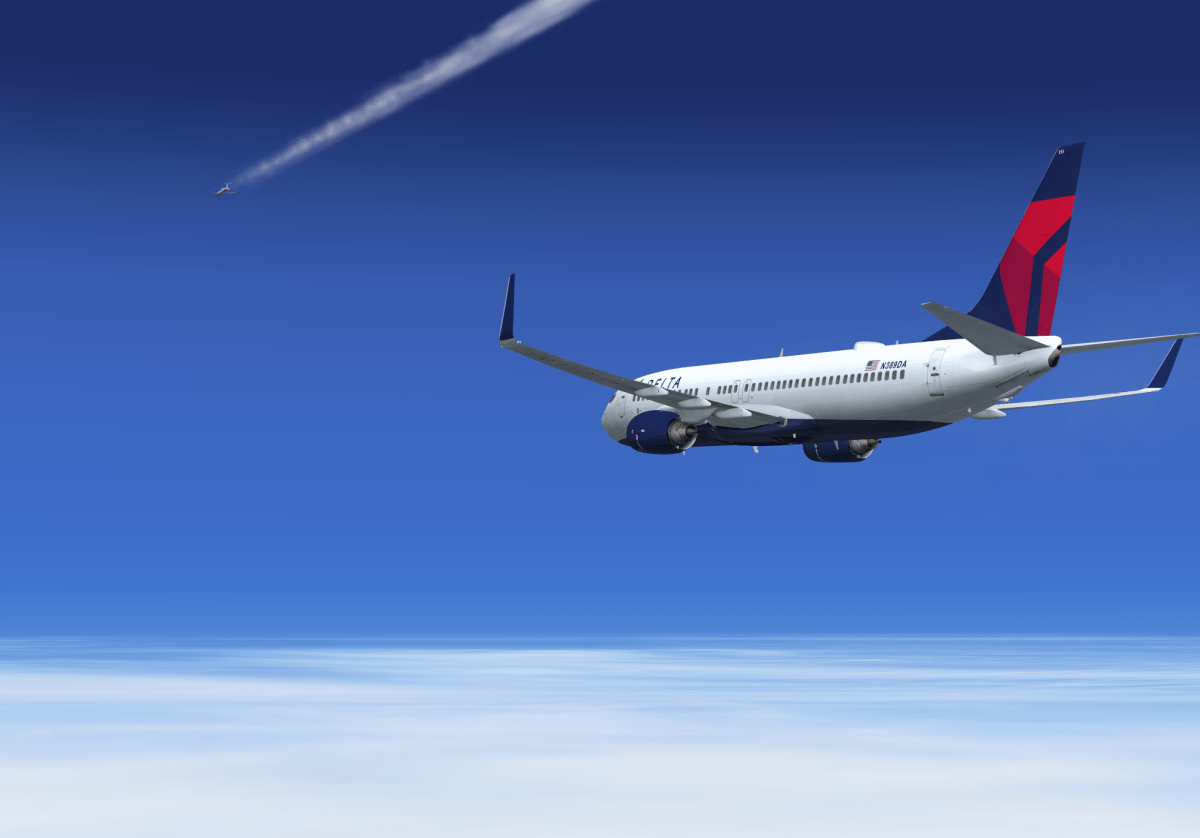
True true, but I was thinking it was a situation where proximity might have been an issue had one of us altered our trajectories. The other aircraft actually had made a course change while in my vicinity, and I was thinking what if it had been a course or speed change that might get us closer together in a matter of seconds? Too soon to react? Instead of the one he made to veer away from me... TCAS in FSX (PMDG) has often given me a first level annunciation "Traffic!" and when I identified the source either visually or on TCAS radar I've often said to myself "Really? He's a danger? That far away?" and in this particular case I was reading logos on the side of the other plane I suppose it must have something to do with closure speed, or if the courses are reciprocal within a certain window... This particular incident did sort of unfold in slow motion, and it was interesting to watch, but the whole time I had my hands on the controls just waiting for him to do something odd
-
Flight from KMCO to KSEA and I was reading while keeping one eye on the screen, and an aircraft drifted in from the left about a mile distant and above. I watched as it continued to move directly across my nose always above while I checked TCAS, which was on, normal and monitoring. The aircraft clearly appeared in the display but was neither flagged with an audio warning nor red warning color. I was probably doing 20 knots over his speed and catching up very, very slowly... After moving from left to right, it then descended suddenly before making a course change away from me until it disappeared behind. During the entire maneuver our speeds were nearly identical, and there was no danger of collision as long as everything continued as it did. It seemed extremely close though and I was surprised since TCAS is usually VERY good at warning me, or getting my attention when appropriate. Is this particular incident a failure or shortcoming of the simulation, or are planes on nearly the same heading and speed allowed to fly this close without TCAS warning? I would think when you can clearly read the livery on the other plane, it might be too close?

-
lol! You can't do that on a sportbike, you get this painful digging sensation in your chest as you're laying on the tank and its stabbing you in the sternum

