Skip to content
View in the app

A better way to browse. Learn more.

The AVSIM Community

A full-screen app on your home screen with push notifications, badges and more.

To install this app on iOS and iPadOS
  1. Tap the Share icon in Safari
  2. Scroll the menu and tap Add to Home Screen.
  3. Tap Add in the top-right corner.
To install this app on Android
  1. Tap the 3-dot menu (⋮) in the top-right corner of the browser.
  2. Tap Add to Home screen or Install app.
  3. Confirm by tapping Install.

JonyShieh

Members
  • Joined

  • Last visited

  1. i just can't unregister my 777,why is that ? if i reinstalled my OS,can i use the product as well?
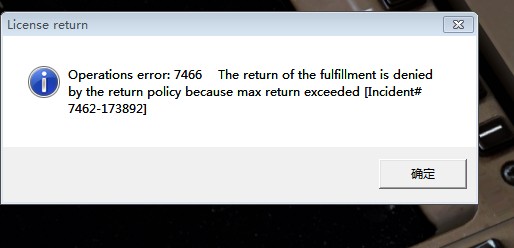
  2. I just can't unregister my PMDG777 after doing it several times in FMC/CDU ,and it indicated this picture
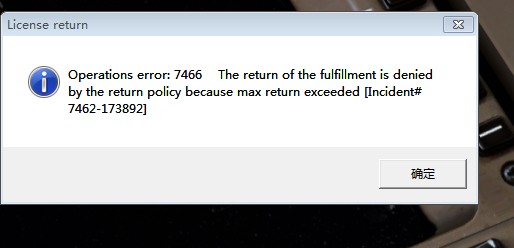
  3. hey folks,i just can't unregister my PMDG777 in FMC/CDU,after doing it for several times, i dont know why ,is it that if i wanna reinstall the product or install it on another PC ,i just need to unregister it ? and it indicated that Operations error:7466 The return of the fulfillment is denied by the return policy because max return exceeded{ Incident#7462-173892],thanks any tips
  4. Captain ,could you please some pics of the VC?
  5. JonyShieh posted a topic in PMDG 777
    well, Beoing 787 ,the most advanced commercial airplane, existed in the world, i just wondering in my mind if PMDG ever thought of developing B787 ?
  6. i've installed PMDG737 ,it's a great plane except that there is no sound warning when i disconnect AP ,I extend flaps,set AT ,and also fire warning bells doesn't work, any one have encountered the same probmes ? any help you could offer ,many thanks
  7. hey ,Newbie,have your problems with GPWS and sounds solved ? i've got the same problems, don't know how to handle it ,any help you could give me please?

Account

Navigation

Search

Search

Configure browser push notifications

Chrome (Android)
  1. Tap the lock icon next to the address bar.
  2. Tap Permissions → Notifications.
  3. Adjust your preference.
Chrome (Desktop)
  1. Click the padlock icon in the address bar.
  2. Select Site settings.
  3. Find Notifications and adjust your preference.