


Remys
Members
-
Joined
-
Last visited
Everything posted by Remys
-
I have the Saitek X52 Pro everything was working well until the approach phase. just the POV was working and all other functions no. and I checked the controller is enabled in FSX I used it for take off and everything I this a known issue? help would be appreciated thank you. this only happens with sp1 and 777-300 anyone faced this issue ? thank you
-
not dumb at all, sometimes sometimes it is a very simple thing but the user doesn't see it. as for flying near rain yes I did.
-
I do have ASN and loaded the flight plan and uploaded the datalink and exported also from pfpx (linked to FSX the weather to the WX folder) I loaded the weather into FMC and tried every single possibility (auto, Manual gain, WX, WX +T) but nothing on the screen your help would be appreciated
-
I do have ASN and loaded the flight plan and uploaded the datalink and exported also from pfpx (linked to FSX the weather to the WX folder) I loaded the weather into FMC and tried every single possibility (auto, Manual gain, WX, WX +T) but nothing on the screen your help would be appreciated
-
Can't Believe that it has been released. very reasonable price. bought it and downloading the liveries. but cannot find Austrian airlines in the 300 expansion thank you PMDGGGGGGGGGGGGGGGGGGGGG !!!!!!!!!!!!!
-
As Rob Mentioned: "As a result, we are planning for the first half of July as the current release window for the SP1 and 300ER." In ROB AND PMDG WE TRUST
-
Great News. wishing to RSR a speedy recovery everything will be ok at the end and if it is not ok it is not the end Remy :)
-
@DAVE777 was asking myself the same question. why does it depends from ROB. without of course being rude. it could be released
-
Although we were eager to have the SP1 and the 300 this week end, but HEALTH comes in the first place. I wish you a speedy recovery and a successful surgery. and as you mentioned in your post: " if things go well and we can release sooner we will". [hope that this happens:)] Sincerely, Remy
-
yes exactly, it with global disable ezdok it is resetting the QNH to 1013 thank you
-
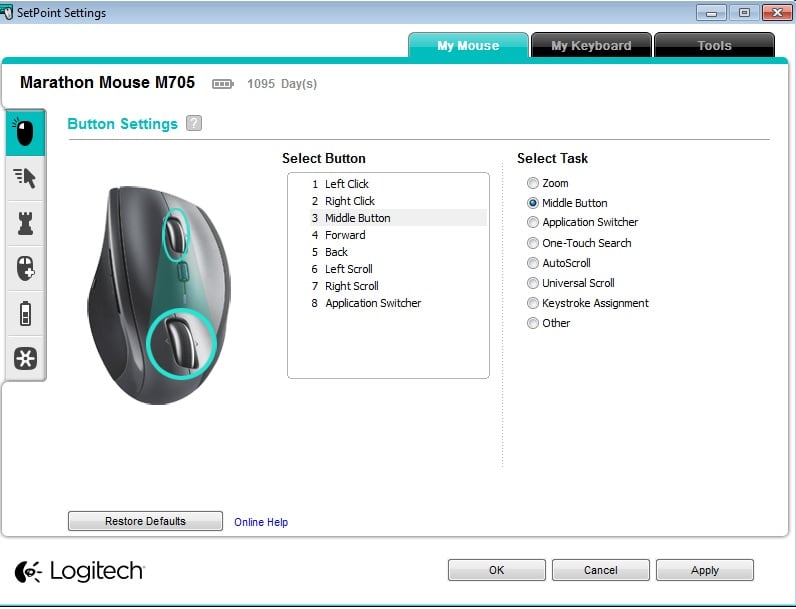
hi, I am trying to put the Altimeter on standby and TCAS (it is mentioned to use the middle mouse button) I am using it but nothing happens. I do have a mouse Logitech M705 in which I can assign functions to the middle button. Attached is the screen shot, and also try another wired USB mouse thought the problem was from it with no result. No solution until now. any help would be appreciated Majestic Q400 V: 1.08 and patch also installed windows 7 64
-
well I liked your assumption, but I wish it was reliable. usualy these info are provided by PMDG for the T7 and FSLabs for A320 in an official statement Regards,
-
british airways, Etihad, Emirate and Qatar airlines
-
hi, just one question I noticed that the cabin ready announcement before departure is triggered using time frame and not having the taxi and before take off checklist completed. same applies during the landing. shouldn't the cabin ready announcement take into consideration that the plane is ready for departure/arrival thank you
-
hi, I've got a 7.1 Razer Megalodon USB headset. and cannot change the sample rate of it in windows 7 it is set to 48000 and cannot be changed I am looking for a workaround in order to change it to 44.1. unfortunately the Razer Megalodon just uses the 7.1 and dvd quality. didn't find a way to change it ....
-
yes, I tried Q more than once, and my sound card is an on board sound card. as for the drivers the latest one is installed :(
-
Hi, after approximately 3 to 4 hours of flights and sometimes randomly I get a total loss of sound and have to complete my flight randomly. in my setup it is really hard for me to unplug and plug again the headsets. any alternate solution as this is very annoying :S
-
Kylee just to let you know that it worked like a charm I was trying it on a SID that is why it was not showing and now enroute perfect ..... Merci
-
thank you, I will subscribe to your Channel on you tube, as they are very informative. and kyle again thank you for being always here when help is needed a Real PMDG HERO and an aviation expert are you doing also tweets? if so please give us the address so we also can be up to date sincerely Remy
-
hi kyle, great video thank you. it explains everything in details. the main problem that I am facing is that in the Rte Page I only have alternate on the FMC and offset is not present, as it is showing in the video ? weird issue. could it be something related to the aircraft config ? +10000000000000000
-
is route offset just used for alternate? cause I can only find the offset in the alternate route page? can an Offset be set on the actual rte with a deviation to the R or L in nm ? thank you.
-
--Deleted-- Sent from my SM-N9005 using Tapatalk Nice Shots Sent from my SM-N9005 using Tapatalk
-
ok thanks , that did the job and answer my question. and I just asked this because the visual icing effects works on majestic q400 and pmdg Jetstream. thanks for your answer
-
yes I do. FSX could be 100 years old, but PMDG 777 is a brand new product with almost all effects simulated. so why not to ask if this has been simulated as in real life ? thanks
-
did anyone tried to turn the anti ice off (windows and wings) and check if ice accumulates on windshield (displaying icing on display panel) or wings?
