


Propwash
Members
-
Joined
-
Last visited
Everything posted by Propwash
-
Herve, Look here for additional information if you want: FSMAP GUIDEBOOK page 64-67 Rgds, Bob
-
yeah.... great idea! Now that you mention it, the saved Direct To flight plan .FLT contains all of the original flight plan waypoints, plus the information that Direct To was initiated. By cancelling DTO after you load saved flight, you should get the flight plan back :smile:
-
Hi Paul, You're right that FlightPlanWaypointICAO is missing in the flight plan if you load a saved DTO flight. However, FlightPlanWaypointIdent and FlightPlanWaypointType are still there and WaypointAirportICAO, or whatever facility type was the target of the DTO, of the destination can be created (or searched) from those. I know you're an expert in the gps module so I guess you're already doing that. A bug? Maybe one can argue the Load Flight function should populate the destination ICAO in a Direct To flight plan. But even if it did, FlightPlanWaypointICAO would also need to be transferred into WaypointAirportICAO or FacilityICAO before the group data could be accessed. Bob tested with FSXA. Not P3D family
-
Great job Francois! So much work involved in your project. It's good to see SIDs and STARs incorporated using the FreeNav DB Group work - you won't find many examples of this in the forums, but now we have your effort. Thanks for taking the time to post your work ... and all the screen shots, it really looks great. I agree with Roman - it has been fun watching your progress. Well done. Bob McElrath
-
http://www.fs2x.com/Tutorials.htm Note, there are two schemas, or styles of XML used to write FS gauges. "FS9" schema (actually, I believe the origin is FS2002) and "FSX" schema. FS9 works in FS9, FSX, and P3D and most people would say it is the simplest and easiest to write. FSX ("ACES") schema is not backward compatible in FS9. The XML format used in the tutorial linked above is FS9. Most XML gauge examples you find are FS9 format. The Flight Sim SDK is helpful too, if for no other reason than to list all of the flight sim variables and XML math and string operators. Here's the online versions provided when FSX came out. Variables and XML Gauges. Another good place to start is to study the XML gauges that ship with Flight Sim ... check out the Beech Baron. Our forum moderator, Bill Leaming, may want to add more here too ... he advocates use of the older FS9 schema. He's also answered the "Where are XML Tutorials?" questions way more than any other person on the planet. Bob
-
Propwash replied to dragonflightdesign's topic in FSX/FSX-SE Aircraft and Panel Design Forum - How ToSheesh Dai, it's free.
-
Propwash replied to dragonflightdesign's topic in FSX/FSX-SE Aircraft and Panel Design Forum - How ToHello Dai, I see you have moved beyond this question now, but the answer to your initial question about the "5" can be found here, page 9. Bob
-
Honestly, I dont know how to attach pics since AVSIM changed their rules, and if you cannot get into the Google Drive folder that I set up with the files for this response, then I cannot help... at least, not in AVSIM. If you post the question at FSDeveloper.com gauges forum, I can help there If I knew how you attached your pic, I would do the same... AVSIM ... I dunno
-
hmmmmm ... undoubtedly an error on my part ... give me a few mins ... See if that works ......... my prob ... never used Google Drive before https://drive.google.com/#folders/0Bzp20cxkeu7iNEVoZTlMNjZpMTg
-
Check that Axis and Position of your needles are correct. The attached pic, Gauge - Rotating Needle.jpg, will help: https://drive.google.com/#folders/0Bzp20cxkeu7iNEVoZTlMNjZpMTg Then, have a look at the Fuel Quantity gauge in that folder. Its similar in construction to your OA Temp gauge. Bob
-
-
Hi Paul, The question is, can each player in a multiplayer session have their own radar / TCAS gauge that accesses ITraffic info variables, and each player see all the other players? I know how ITrafficInfo variables and the FSX ATC Radar gauge work but I have always used it with AI traffic and never yet run a multiplayer session where each aircraft has its own TCAS or radar. Just wondering if there are conflicts with L:Vars, ITrafficInfo variables and such things in multiplayer mode that I need to be aware of. I probably should just install a new copy of FSX on a separate pc and set up my own multiplayer to find out, just I haven't done that yet. Bob
-
Hello, I am wondering if anyone has experience using ITrafficInfo variables in Multiplayer mode? The ESP SDK clearly suggests that ITrafficInfo variables work in multiplayer, and I know about its use in an ATC Controller setting from the stock FSX radar gauge, but I wonder if each player, using ITrafficInfo variables in a gauge in their own aircraft, can see the all the other players' aircraft? I've written an XML TCAS gauge that works well with AI aircraft, but will it work in multiplayer mode, with each player having this gauge in their panel? Just curious if anyone has an idea. Thanks, Bob
-
Hello again Jim, First of all, thank you again for your prompt replies and willingness to help not only me, but also the many hundreds of people that use AVSIM to help make Flight Sim more enjoyable. Regarding my question, I have now solved it. The reason my Flight1 Cessna 421 went berserk was not due to a texture issue, but the simple fact that I had forgotten to select "Run as Administrator" in the Compatibilty tab of fsx.exe Properties. I had previously opened fsx.exe Properties, but I concentrated only on the Security tab, trying to make sure I had Full control Administrator privileges. Every time I reinstall my OS, I seem to get confused and frustrated about Admin prvileges (even though I am always the only User, therefore, also the Admin). I tried many things such as to make sure I was the owner of the "Microsoft Flight Simulator X" folder, but that did not solve it. To make a long story short, the simple problem was that I forgot to open the Compatibility tab and check "Run as Administrator". I see that you regularly advise people to "Run as Admin", but I ran only FSX setup.exe As Administrator. Of course, that alone is not sufficient. I will read your responses more carefully from now on. I appreciate your quick responses. On behalf of all the AVSIM members that visit here ... thanks! Bob
-
Thanks Jim, I have not found the offending texture yet. What is perplexing is that all was fine with this aircraft until I re-installed the OS. No change in aircraft files, including texture. And works fine on my laptop. Maybe the problem is in the re-installed OS rather than FSX. One thing different is that I am plagued with Administrator Privilege issues now but cannot see that it would be related to my aircraft problem, of course. This is still a mystery to me ... Thanks for the prompt response. Regards, Bob
-
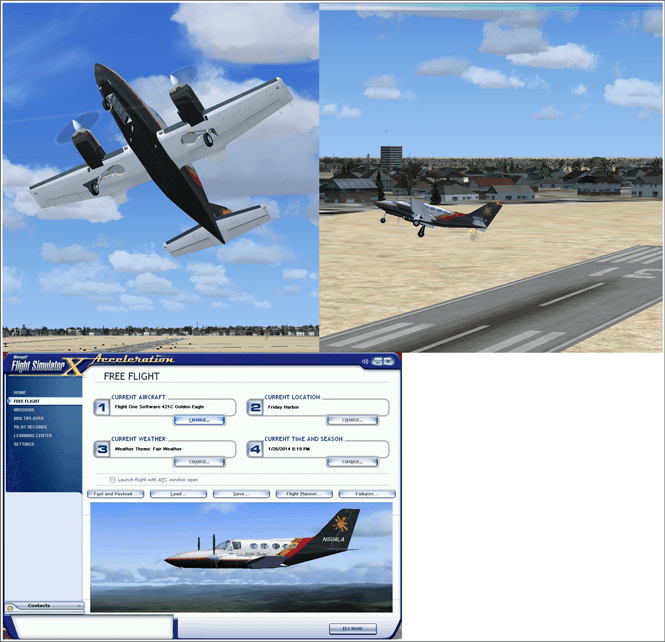
My favorite FS9 airplane goes berserk after I re-installed my desktop computer’s Win7 Ultimate OS and FSXA. When I now attempt to fly the Flight1 Cessna 421, the aircraft immediately goes crazy – full power (apparently), pitching up wildly, rapidly rotating / tumbling about all 3 axes until a CTD occurs. All the stock FSXA aircraft work normally. Before I re-installed the OS and FSXA, the Cessna 421 was behaving perfectly – as it still is in my laptop computer which also runs Windows 7 and FSXA (long ago re-wrote the gauges to work in FSX). The problem began after I reinstalled Windows 7 Ult and then FSX and FSXA (where setup.exe was Run as Administrator). To install the Cessna 421 in the new desktop pc installation, I simply copied the 421 folder from my laptop FSXA and pasted it into the same folder in the desktop FSXA which has always worked before. The aircraft appears normal when it is selected; the problem occurs immediately when FLY NOW! is clicked. I’ve removed then re-installed FSX and then FSXA and the problem persists. Any ideas? Thanks, Bob Problem signature: Problem Event Name: APPCRASH Application Name: fsx.exe Application Version: 10.0.61637.0 Application Timestamp: 46fadb14 Fault Module Name: sim1.dll Fault Module Version: 10.0.61637.0 Fault Module Timestamp: 46fadb59 Exception Code: c0000005 Exception Offset: 0001bfa3 OS Version: 6.1.7601.2.1.0.256.1 Locale ID: 1033 Additional information about the problem: LCID: 1033 AppCrashView Version=1 EventType=APPCRASH EventTime=130352177207938872 ReportType=2 Consent=1 ReportIdentifier=8fd63219-8690-11e3-919b-10bf48d6b145 IntegratorReportIdentifier=8fd63218-8690-11e3-919b-10bf48d6b145 WOW64=1 Response.type=4 Sig[0].Name=Application Name Sig[0].Value=fsx.exe Sig[1].Name=Application Version Sig[1].Value=10.0.61637.0 Sig[2].Name=Application Timestamp Sig[2].Value=46fadb14 Sig[3].Name=Fault Module Name Sig[3].Value=sim1.dll Sig[4].Name=Fault Module Version Sig[4].Value=10.0.61637.0 Sig[5].Name=Fault Module Timestamp Sig[5].Value=46fadb59 Sig[6].Name=Exception Code Sig[6].Value=c0000005 Sig[7].Name=Exception Offset Sig[7].Value=0001bfa3 DynamicSig[1].Name=OS Version DynamicSig[1].Value=6.1.7601.2.1.0.256.1 DynamicSig[2].Name=Locale ID DynamicSig[2].Value=1033 UI[2]=C:\Program Files (x86)\Microsoft Games\Microsoft Flight Simulator X\fsx.exe UI[3]=A fatal error occurred. UI[4]=Windows can check online for a solution to the problem. UI[5]=Check online for a solution and close the program UI[6]=Check online for a solution later and close the program UI[7]=Close the program LoadedModule[0]=C:\Program Files (x86)\Microsoft Games\Microsoft Flight Simulator X\fsx.exe LoadedModule[1]=C:\Windows\SysWOW64\ntdll.dll LoadedModule[2]=C:\Windows\syswow64\kernel32.dll LoadedModule[3]=C:\Windows\syswow64\KERNELBASE.dll LoadedModule[4]=C:\Windows\WinSxS\x86_microsoft.vc80.mfc_1fc8b3b9a1e18e3b_8.0.50727.6195_none_cbf5e994470a1a8f\MFC80.DLL LoadedModule[5]=C:\Windows\WinSxS\x86_microsoft.vc80.crt_1fc8b3b9a1e18e3b_8.0.50727.6195_none_d09154e044272b9a\MSVCR80.dll LoadedModule[6]=C:\Windows\syswow64\msvcrt.dll LoadedModule[7]=C:\Windows\syswow64\GDI32.dll LoadedModule[8]=C:\Windows\syswow64\USER32.dll LoadedModule[9]=C:\Windows\syswow64\ADVAPI32.dll LoadedModule[10]=C:\Windows\SysWOW64\sechost.dll LoadedModule[11]=C:\Windows\syswow64\RPCRT4.dll LoadedModule[12]=C:\Windows\syswow64\SspiCli.dll LoadedModule[13]=C:\Windows\syswow64\CRYPTBASE.dll LoadedModule[14]=C:\Windows\syswow64\LPK.dll LoadedModule[15]=C:\Windows\syswow64\USP10.dll LoadedModule[16]=C:\Windows\syswow64\SHLWAPI.dll LoadedModule[17]=C:\Windows\syswow64\ole32.dll LoadedModule[18]=C:\Windows\system32\apphelp.dll LoadedModule[19]=C:\Windows\AppPatch\AcGenral.DLL LoadedModule[20]=C:\Windows\system32\UxTheme.dll LoadedModule[21]=C:\Windows\system32\WINMM.dll LoadedModule[22]=C:\Windows\system32\samcli.dll LoadedModule[23]=C:\Windows\syswow64\OLEAUT32.dll LoadedModule[24]=C:\Windows\system32\MSACM32.dll LoadedModule[25]=C:\Windows\system32\VERSION.dll LoadedModule[26]=C:\Windows\syswow64\SHELL32.dll LoadedModule[27]=C:\Windows\system32\sfc.dll LoadedModule[28]=C:\Windows\system32\sfc_os.DLL LoadedModule[29]=C:\Windows\system32\USERENV.dll LoadedModule[30]=C:\Windows\system32\profapi.dll LoadedModule[31]=C:\Windows\system32\dwmapi.dll LoadedModule[32]=C:\Windows\syswow64\SETUPAPI.dll LoadedModule[33]=C:\Windows\syswow64\CFGMGR32.dll LoadedModule[34]=C:\Windows\syswow64\DEVOBJ.dll LoadedModule[35]=C:\Windows\syswow64\urlmon.dll LoadedModule[36]=C:\Windows\syswow64\api-ms-win-downlevel-ole32-l1-1-0.dll LoadedModule[37]=C:\Windows\syswow64\api-ms-win-downlevel-shlwapi-l1-1-0.dll LoadedModule[38]=C:\Windows\syswow64\api-ms-win-downlevel-advapi32-l1-1-0.dll LoadedModule[39]=C:\Windows\syswow64\api-ms-win-downlevel-user32-l1-1-0.dll LoadedModule[40]=C:\Windows\syswow64\api-ms-win-downlevel-version-l1-1-0.dll LoadedModule[41]=C:\Windows\syswow64\api-ms-win-downlevel-normaliz-l1-1-0.dll LoadedModule[42]=C:\Windows\syswow64\normaliz.DLL LoadedModule[43]=C:\Windows\syswow64\iertutil.dll LoadedModule[44]=C:\Windows\syswow64\WININET.dll LoadedModule[45]=C:\Windows\system32\MPR.dll LoadedModule[46]=C:\Windows\AppPatch\AcLayers.DLL LoadedModule[47]=C:\Windows\system32\WINSPOOL.DRV LoadedModule[48]=C:\Windows\AppPatch\AcSpecfc.DLL LoadedModule[49]=C:\Windows\WinSxS\x86_microsoft.windows.common-controls_6595b64144ccf1df_5.82.7601.18201_none_ec80f00e8593ece5\COMCTL32.dll LoadedModule[50]=C:\Windows\system32\mscms.dll LoadedModule[51]=C:\Windows\system32\DDRAW.dll LoadedModule[52]=C:\Windows\system32\DCIMAN32.dll LoadedModule[53]=C:\Windows\syswow64\COMDLG32.dll LoadedModule[54]=C:\Windows\syswow64\IMM32.dll LoadedModule[55]=C:\Windows\syswow64\MSCTF.dll LoadedModule[56]=C:\Windows\syswow64\WS2_32.dll LoadedModule[57]=C:\Windows\syswow64\NSI.dll LoadedModule[58]=C:\Windows\system32\msi.dll LoadedModule[59]=C:\Windows\WinSxS\x86_microsoft.vc80.mfcloc_1fc8b3b9a1e18e3b_8.0.50727.6195_none_03ce2c72205943d3\MFC80ENU.DLL LoadedModule[60]=C:\Program Files (x86)\Microsoft Games\Microsoft Flight Simulator X\language.dll LoadedModule[61]=C:\Program Files (x86)\Microsoft Games\Microsoft Flight Simulator X\API.DLL LoadedModule[62]=C:\Windows\WinSxS\x86_microsoft.vc80.crt_1fc8b3b9a1e18e3b_8.0.50727.6195_none_d09154e044272b9a\MSVCP80.dll LoadedModule[63]=C:\Program Files (x86)\Microsoft Games\Microsoft Flight Simulator X\ablscpt.dll LoadedModule[64]=C:\Program Files (x86)\Microsoft Games\Microsoft Flight Simulator X\flight.dll LoadedModule[65]=C:\Program Files (x86)\Microsoft Games\Microsoft Flight Simulator X\ai_player.dll LoadedModule[66]=C:\Program Files (x86)\Microsoft Games\Microsoft Flight Simulator X\acontain.dll LoadedModule[67]=C:\Program Files (x86)\Microsoft Games\Microsoft Flight Simulator X\controls.dll LoadedModule[68]=C:\Windows\system32\DINPUT8.dll LoadedModule[69]=C:\Program Files (x86)\Microsoft Games\Microsoft Flight Simulator X\fsui.dll LoadedModule[70]=C:\Program Files (x86)\Microsoft Games\Microsoft Flight Simulator X\atc.dll LoadedModule[71]=C:\Program Files (x86)\Microsoft Games\Microsoft Flight Simulator X\facilities.dll LoadedModule[72]=C:\Program Files (x86)\Microsoft Games\Microsoft Flight Simulator X\demo.dll LoadedModule[73]=C:\Program Files (x86)\Microsoft Games\Microsoft Flight Simulator X\main.dll LoadedModule[74]=C:\Program Files (x86)\Microsoft Games\Microsoft Flight Simulator X\fe.dll LoadedModule[75]=C:\Program Files (x86)\Microsoft Games\Microsoft Flight Simulator X\util.dll LoadedModule[76]=C:\Program Files (x86)\Microsoft Games\Microsoft Flight Simulator X\simprop.dll LoadedModule[77]=C:\Program Files (x86)\Microsoft Games\Microsoft Flight Simulator X\g2d.dll LoadedModule[78]=C:\Windows\system32\d3dx9_34.dll LoadedModule[79]=C:\Windows\system32\d3dx10_34.dll LoadedModule[80]=C:\Windows\system32\d3d9.dll LoadedModule[81]=C:\Windows\system32\d3d8thk.dll LoadedModule[82]=C:\Program Files (x86)\Microsoft Games\Microsoft Flight Simulator X\g3d.dll LoadedModule[83]=C:\Program Files (x86)\Microsoft Games\Microsoft Flight Simulator X\panels.dll LoadedModule[84]=C:\Program Files (x86)\Microsoft Games\Microsoft Flight Simulator X\multiplayer.dll LoadedModule[85]=C:\Program Files (x86)\Microsoft Games\Microsoft Flight Simulator X\ui.dll LoadedModule[86]=C:\Program Files (x86)\Microsoft Games\Microsoft Flight Simulator X\sound.dll LoadedModule[87]=C:\Program Files (x86)\Microsoft Games\Microsoft Flight Simulator X\sim1.dll LoadedModule[88]=C:\Program Files (x86)\Microsoft Games\Microsoft Flight Simulator X\simscheduler.dll LoadedModule[89]=C:\Program Files (x86)\Microsoft Games\Microsoft Flight Simulator X\visualfx.dll LoadedModule[90]=C:\Program Files (x86)\Microsoft Games\Microsoft Flight Simulator X\window.dll LoadedModule[91]=C:\Program Files (x86)\Microsoft Games\Microsoft Flight Simulator X\terrain.dll LoadedModule[92]=C:\Program Files (x86)\Microsoft Games\Microsoft Flight Simulator X\weather.dll LoadedModule[93]=C:\Windows\system32\DSOUND.dll LoadedModule[94]=C:\Windows\system32\POWRPROF.dll LoadedModule[95]=C:\Program Files (x86)\Microsoft Games\Microsoft Flight Simulator X\symmap.dll LoadedModule[96]=C:\Windows\WinSxS\x86_microsoft.windows.gdiplus_6595b64144ccf1df_1.1.7601.18120_none_72d2e82386681b36\gdiplus.dll LoadedModule[97]=C:\Windows\system32\MSIMG32.dll LoadedModule[98]=C:\Program Files (x86)\Microsoft Games\Microsoft Flight Simulator X\xuipc.dll LoadedModule[99]=C:\Program Files (x86)\Microsoft Games\Microsoft Flight Simulator X\livingwater.dll LoadedModule[100]=C:\Program Files (x86)\Microsoft Games\Microsoft Flight Simulator X\fs-traffic.dll LoadedModule[101]=C:\Program Files (x86)\Microsoft Games\Microsoft Flight Simulator X\gps.dll LoadedModule[102]=C:\Windows\system32\MSWSOCK.dll LoadedModule[103]=C:\Windows\system32\SHFOLDER.dll LoadedModule[104]=C:\Windows\system32\CRYPTSP.dll LoadedModule[105]=C:\Windows\system32\rsaenh.dll LoadedModule[106]=C:\Windows\syswow64\WINTRUST.dll LoadedModule[107]=C:\Windows\syswow64\CRYPT32.dll LoadedModule[108]=C:\Windows\syswow64\MSASN1.dll LoadedModule[109]=C:\Windows\syswow64\CLBCatQ.DLL LoadedModule[110]=C:\Windows\system32\wbem\wbemprox.dll LoadedModule[111]=C:\Windows\system32\wbemcomn.dll LoadedModule[112]=C:\Windows\system32\RpcRtRemote.dll LoadedModule[113]=C:\Windows\system32\wbem\wbemsvc.dll LoadedModule[114]=C:\Windows\system32\wbem\fastprox.dll LoadedModule[115]=C:\Windows\system32\NTDSAPI.dll LoadedModule[116]=C:\Windows\WinSxS\x86_microsoft.msxml2_6bd6b9abf345378f_4.20.9876.0_none_b7e610287b2b4ea5\MSXML4.DLL LoadedModule[117]=C:\Windows\system32\dxgi.dll LoadedModule[118]=C:\Windows\system32\d3d11.dll LoadedModule[119]=C:\Windows\system32\nvd3dum.dll LoadedModule[120]=C:\Windows\syswow64\PSAPI.DLL LoadedModule[121]=C:\Windows\system32\D3DCompiler_34.dll LoadedModule[122]=C:\Windows\system32\WindowsCodecs.dll LoadedModule[123]=C:\Windows\system32\d3d10_1.dll LoadedModule[124]=C:\Windows\system32\d3d10_1core.dll LoadedModule[125]=C:\Program Files (x86)\NVIDIA Corporation\3D Vision\nvSCPAPI.dll LoadedModule[126]=C:\Windows\SysWOW64\dxdiagn.dll LoadedModule[127]=C:\Windows\SysWOW64\d3d10.dll LoadedModule[128]=C:\Windows\SysWOW64\d3d10core.dll LoadedModule[129]=C:\Windows\system32\winbrand.dll LoadedModule[130]=C:\Windows\system32\nvapi.dll LoadedModule[131]=C:\Windows\system32\WTSAPI32.DLL LoadedModule[132]=C:\Windows\system32\WINSTA.dll LoadedModule[133]=C:\Windows\SysWOW64\gameux.dll LoadedModule[134]=C:\Windows\WinSxS\x86_microsoft.windows.common-controls_6595b64144ccf1df_6.0.7601.17514_none_41e6975e2bd6f2b2\COMCTL32.dll LoadedModule[135]=C:\Windows\SysWOW64\XmlLite.dll LoadedModule[136]=C:\Windows\SysWOW64\wer.dll LoadedModule[137]=C:\Windows\System32\Wpc.dll LoadedModule[138]=C:\Windows\System32\wevtapi.dll LoadedModule[139]=C:\Windows\System32\msxml6.dll LoadedModule[140]=C:\Windows\system32\SAMLIB.dll LoadedModule[141]=C:\Windows\system32\netutils.dll LoadedModule[142]=C:\Windows\system32\uiautomationcore.dll LoadedModule[143]=C:\Windows\system32\OLEACC.dll LoadedModule[144]=C:\Windows\System32\MMDevApi.dll LoadedModule[145]=C:\Windows\System32\PROPSYS.dll LoadedModule[146]=C:\Windows\system32\AUDIOSES.DLL LoadedModule[147]=C:\Windows\system32\RICHED20.DLL LoadedModule[148]=C:\Windows\system32\HID.DLL LoadedModule[149]=C:\Windows\system32\XInput9_1_0.dll LoadedModule[150]=C:\Windows\system32\wdmaud.drv LoadedModule[151]=C:\Windows\system32\ksuser.dll LoadedModule[152]=C:\Windows\system32\AVRT.dll LoadedModule[153]=C:\Windows\system32\msacm32.drv LoadedModule[154]=C:\Windows\system32\midimap.dll LoadedModule[155]=C:\Windows\system32\dinput.DLL LoadedModule[156]=C:\Windows\System32\wship6.dll LoadedModule[157]=C:\Windows\System32\wshtcpip.dll LoadedModule[158]=C:\Windows\SysWOW64\ieframe.dll LoadedModule[159]=C:\Windows\SysWOW64\api-ms-win-downlevel-shell32-l1-1-0.dll LoadedModule[160]=C:\Windows\system32\api-ms-win-downlevel-shlwapi-l2-1-0.dll LoadedModule[161]=C:\Windows\system32\ntmarta.dll LoadedModule[162]=C:\Windows\syswow64\WLDAP32.dll LoadedModule[163]=C:\Windows\system32\Secur32.dll LoadedModule[164]=C:\Windows\system32\api-ms-win-downlevel-advapi32-l2-1-0.dll LoadedModule[165]=C:\Windows\SysWOW64\mshtml.dll LoadedModule[166]=C:\Windows\system32\msimtf.dll LoadedModule[167]=C:\Windows\system32\msls31.dll LoadedModule[168]=C:\Windows\system32\d2d1.dll LoadedModule[169]=C:\Windows\system32\DWrite.dll LoadedModule[170]=C:\Windows\system32\D3D10Warp.dll LoadedModule[171]=C:\Windows\system32\MLANG.dll LoadedModule[172]=C:\Program Files (x86)\Microsoft Games\Microsoft Flight Simulator X\GAUGES\Bendix_King_Radio.DLL LoadedModule[173]=C:\Windows\system32\msadp32.acm Sec[0].Key=LCID Sec[0].Value=1033 FriendlyEventName=Stopped working ConsentKey=APPCRASH AppName=Microsoft® Flight Simulator X AppPath=C:\Program Files (x86)\Microsoft Games\Microsoft Flight Simulator X\fsx.exe
-
Looks like you have several third party FSX add-ins. Possible conflict from one of those? Of course, you probably know this already ... but to save time, you might just re-install FSXA and add the others back one by one. Bob
-
They're gone again. Must be frustrating
-
Propwash replied to dragonflightdesign's topic in FSX/FSX-SE Aircraft and Panel Design Forum - How ToThanks Dai. You put so much work into this, and it keeps getting better and better. And better! Bob
-
Is this what you are looking for? Angle equals arctan a/b, xml is: a b / atg rddg but I figure you already know that .... Bob
-
Your 767 has rockets? Bad a_ _ 767!
-
Hi Karol, The logic of your suggested flow is understood, but as far as I know, the Mouse Parameters (M:X) and (M:Y) are read-only so that would preclude slaving the mouse. If that could be done however, then as I see it, one would need to work through the following issues: Scale - translating lat lon into gauge units for movement of the mouse. That could certainly be done for the case of TrackUp=0 or 1, and as a function of zoom Traffic Selection - as you note in post #10 above, there is the question of exactly how does Arne's code select the AI target? I have never looked at his code to try to figure that out TrafficInfo update rates - The update frequency of TrafficInfo variables used in automatic tracking calculations should be verified. In FSX for example, ITrafficInfo:CurrentDistance is updated every two seconds, not every gauge update cycle I m really glad to see that you and Jan and a few others are pushing the capabilities of the nav and map related modules of FS. Bob
-
Right, the ITrafficInfo xml variables are not available in FS9. Karol might be correct that the FS9 and FSX traffic modules are similar, but that should be qualified to say only if you work with them in C++. The xml interface isn't similar. MSFT didnt provide one for FS9 and Arne's module is not a full ITrafficInfo toolbox. Arne's module gives the FS9 xml user a few traffic information variables (that can be stored), but only for a single target and only for a point in time defined by a mouse click. I dont see how it could be automatically tracked. Bob
-
I just read through Arne's documentation again, and my two cents worth is that a new FS9 TrafficInfo.dll-to-xml module would need to be written, or Arne's edited, to provide information via XML variables about all AI or multiplayer traffic. In other words, to create ITrafficInfo variables for FS9. According to his documentation, Arne's module provides traffic information such as distance, bearing and speed but only for a single AI target that is chosen via mouse click. However, to accomplish what you want to do in FS9, I believe what's needed is an indexed list of traffic information such as lat/lon and altitude, and to make things even a little easier, ground track, speed, bearing from user aircraft. If that were available, everything else could be done in xml. Of course, if one were to edit Arne's module, then the forward-looking spatial filtering and custom symbol work could be taken care of in the C++. Bob
-
Jan, One additional comment ... in FSX CustomDraw, one can select Track Line when displaying LayerVehicles using the TCAS symbol. I presume Track Line is what you mean by velocity vector? All airborne A/I aircraft within map view will be displayed using the diamond shape "TCAS symbol" plus the velocity vector = Track Line, regardless of altitude of A/I traffic or bearing from User Aircraft. Bob
