


CraigPhillips
Members
-
Joined
-
Last visited
Everything posted by CraigPhillips
-
Let's not debate about that... let's try and work out why the download speeds are slow... (they still are for me). :smile:
-
Hi guys, I have been doing my own tests here. I too use the Amazon S3 storage to store files. Downloading the PSX 777 Base Package today I was getting 16Kb/s; using a download accelerator I was getting 374Kb/s. Now with a 500Mb file on my AWS account (located in Ireland, I live in the UK) I was getting 3Mb/s, and with a download accelerator 7Mb/s. I use the Amazon cloud functionality so it appears on multiple servers around the globe. But it appears PMDG only use a server based in the US (from what I can see). They do not use the Amazon cloud functionality. If they do something is going wrong somewhere for the guys across the pond! Regards Craig
-
Hello, I have just installed PMDG 777-200/300 for P3D V3, all the systems seems to be working fine... however the landing lights do not illuminate the ground. They do in other aircraft such as the Aerosoft Airbus packages. I also have the option in P3D 'Landing-lights illuminate ground' ticked. Any ideas what the problem might be? Kind Regards Craig
-
Op Center update just released...
-
Released
-
It seems as though Rob has/had a problem with P3D whereby when it loses window focus, then freezes for 10 seconds once it regains focus. Its seems as though its a problem with P3D itself and not the PMDG products as it happens with default aircraft too. Rob indicated that this problem may hinder any P3D development for the time being until the issue is resolved.
-
Seconded! Great news!
-
I think it's a known bug that has been previously identified that 'Navdata out of date' can be a false warning... I raised a thread in the past about it... http://forum.avsim.net/topic/431171-nav-data-out-of-date/#entry2897624 I can also confirm, that I recently updated my AIRAC to the latest cycle 1405, but have been getting the 'NAVDATA OUT OF DATA' warning... So I think it's a bug Regards Craig
-
Are you using a licensed or cracked version??
-
It should only take 1-2 mins at the most to start the APU, its not as instant as starting a car engine
-
Also notice if the wind is coming from the left, the rudder swings to the right and vice versa.
-
-
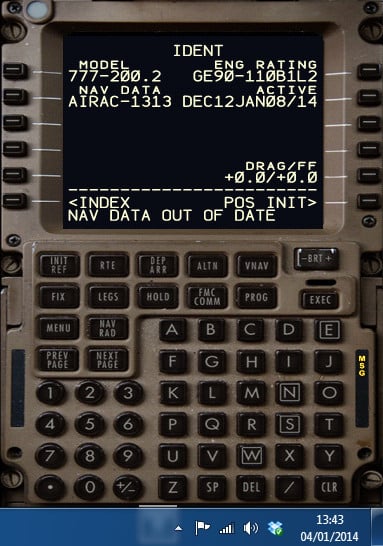
I'm not sure whether this is a bug or not so I shall post any way! Every time I start up the aircraft I now get 'NAV DATA OUT OF DATE' on the FMC. But the current AIRAC is 1313, isnt it? Btw, my date format shown is the UK style 'dd/mm/yyyy' not the US style 'mm/dd/yyyy' Regards Craig
-
Damn it yet another duplicate thread... Could you perhaps make a video so we could try and deduce where you are going wrong?
-
Could you perhaps do a video so we could deduce where you are going wrong?
-
Have you tried the disconnect button on the yoke or key press CTRL + SHIFT + Z, once to disconnect, then again about 3 seconds later to cancel the warning?
-
I thought it would be kind of obvious to do that any way!
-
I've noticed this as well, at Dubai. Pressed F4 to purposely launch into the air then F1 firmly plant the aircraft on the ground. Once I pressed Y to unslew, I found myself doing 300 knots along the ground...
-
From an undisclosed source, Emirates usually use a CI of 32-38 in the LR
-
CTRL + Shift + Z to disconnect. Again to silence the alarm
-
-
-
The Ops Center should check for updates when it starts... thus giving you the option to download it by clicking the cog icon, next to the red cross
-
Screenshot or video might help...
-
Oh the calm before the storm...
