Skip to content
View in the app

A better way to browse. Learn more.

The AVSIM Community

A full-screen app on your home screen with push notifications, badges and more.

To install this app on iOS and iPadOS
  1. Tap the Share icon in Safari
  2. Scroll the menu and tap Add to Home Screen.
  3. Tap Add in the top-right corner.
To install this app on Android
  1. Tap the 3-dot menu (⋮) in the top-right corner of the browser.
  2. Tap Add to Home screen or Install app.
  3. Confirm by tapping Install.
Message added by Poppet

Moderators Note

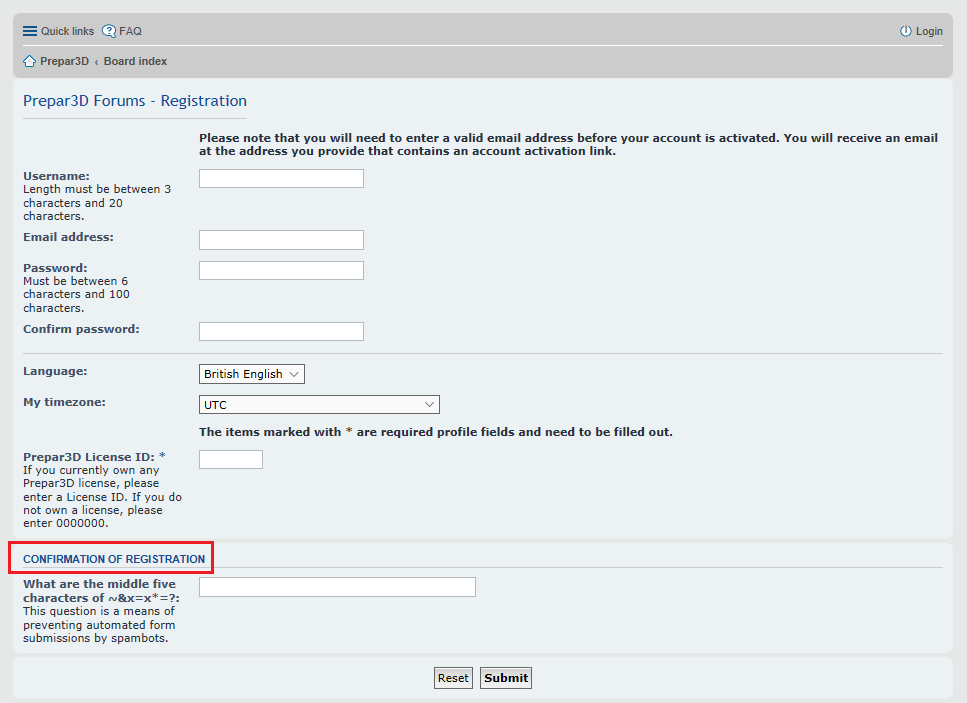
When registering on the Lockheed Martin Forums you will be prompted to answer one Spambot Countermeasure question   

In the bottom box for  "Confirmation of Registration"  you will be required to answer only one of three Questions to complete the registration 

Here are the 3 Questions and Answers                                                                             


1) What are the middle five characters of   ~&x=x*=?:                                                

Answer    &x=x*


2) What are the middle five characters of   x3z!&!z3x?: 

Answer    z!&!z  


3) What are the last seven letters of the program name   Prepar3D?:

Answer    repar3d

Unable to register on the Lockheed Martin Prepar3D Forum

Featured Replies

Hi,

Okay,

I am forced to ask you guys how on earth do I suppose to register, as every answer is wrong?

What are the last seven letters of program Prepar3D?

Give middle 5.....

Nothing works. Does anyone know why?


Thanks in advance. I really need help on the forum.


Peter

Edited by Poppet
Edited title to Include Lockheed Martin

I9 12900K @ 5.1ghz P-cores/ 4.0 ghz E-cores fixed HT off / Corsair iCue H150i Capellix Cooler/ MSI Z690 CARBON WiFi / 32GB Corsair DDR5 RAM @ 5200 mhz XMP on / 12GB MSI 4090 RTX Ventus 3 / 7,5 total TB SSD (2+2+2+1+0,5 all NVMe)/ PSU 850W Corsair / 27" (1080P)

  • Moderator

keep trying until you get it right. Check your keyboard - look closely at the string, perhaps you have a comma where a period is required, etc.

Don't know a way around it - just keep trying.


Vic


RIG#1 - I9 14900K MSI Pro z790 RTX 5070Ti
40" 4K Monitor 3840x2160 

Just checking: For the one from the image you linked above, you needed to type:  x=x*=

If you're sure that's what you did and you're positive you're typing these answers in correctly, I would wait a little while and try again. Because I don't know how else you'd be able to contact LM, if you're still unable to register, send me a PM and I'll post a message about this on the P3D forum on your behalf.

Walter Meier


  • Moderator

well, our Poppet - Elaine who is a mod here at Avsim is also a mod for the LM forums. I'm sure if you asked her REALLY nice, she could look into it for you. :biggrin:


Vic


RIG#1 - I9 14900K MSI Pro z790 RTX 5070Ti
40" 4K Monitor 3840x2160 

3 hours ago, vgbaron said:

well, our Poppet - Elaine who is a mod here at Avsim is also a mod for the LM forums. I'm sure if you asked her REALLY nice, she could look into it for you. :biggrin:


Vic

Even better!

Walter Meier


Hello

Did you get sorted ? 

Here are the 3 of the Confirmation Questions 


1) What are the middle five characters of   ~&x=x*=?:                                                

Answer    &x=x*


2) What are the middle five characters of   x3z!&!z3x?: 

Answer    z!&!z  


3) What are the last seven letters of the program name   Prepar3D?:
Answer    repar3d


Have we considered the possibility that Piotr007 is in fact a spambot and the system is working by keeping him out :P ?

[MSI MPG X870E Carbon | 9800X3D (PBO +200Mhz / -20 Offset) | Corsair 64GB DDR5 (Custom Timings) | RTX 4090 Founders Edition (Undervolted) | WD SNX 850X 4TB + 4TB | Antec Flux Pro]


How many letters in the word.... Me? 

24 minutes ago, Poppet said:

Hello

Did you get sorted ? 

Here are 2 of the Confirmation Questions 


What are the middle five characters of   ~&x=x*=?:     

Answer    &x=x*

------------

What are the middle five characters of x3z!&!z3x?: 

Answer    z!&!z  

If you can't figure that out on your own, they probably don't want you posting anything anyway. :blush:


To be fair, Its actually a tricky enough one and has caught a lot of folks out.  

The ?: at the end of both Questions do not count as characters and this is where the confusion arises  


26 minutes ago, Poppet said:

To be fair, Its actually a tricky enough one and has caught a lot of folks out.  

The ?: at the end of both Questions do not count as characters and this is where the confusion arises  

How true! My comment above shows that I was confused as well. :laugh:

Walter Meier


  • 1 month later...
On 4.7.2017 at 10:46 PM, Poppet said:

To be fair, Its actually a tricky enough one and has caught a lot of folks out.  

The ?: at the end of both Questions do not count as characters and this is where the confusion arises  


This question should definately be reformated! I thought this was a keyboard language problem until I found this. Having ?: in there simply makes the answer you want incorrect :) How about Type the middle five characters of the following string: ~&x=x*=

Magnus Meese

NGX Pilot

VATSIM C1, SUP and Pilot

  • 6 months later...

Hello, good day to everyone!.

I have this problem and I haven't been able to solve it, I have tried in all ways, answers, also with what you contributed and I can't register to the P3D forum, I really don't know what to do :sad:.
I tried with an email to [email protected] and to [email protected], but they refused to help me completely, although I mentioned that I could not register to the forum, they told me to keep trying ¬ ¬ :dry:.

Could it be that you can help me register? I really need your help, since I paid for the system and it doesn't work on my computer. I was reviewing the publications in the P3D forum, as well as the frequently asked questions, and I can't find my case anywhere.

In advance, I thank you very much for your attention and help.

Greetings, Jon747.

16 hours ago, Jon747 said:

Hello, good day to everyone!.

I have this problem and I haven't been able to solve it, I have tried in all ways, answers, also with what you contributed and I can't register to the P3D forum, I really don't know what to do :sad:.
I tried with an email to [email protected] and to [email protected], but they refused to help me completely, although I mentioned that I could not register to the forum, they told me to keep trying ¬ ¬ :dry:.

Could it be that you can help me register? I really need your help, since I paid for the system and it doesn't work on my computer. I was reviewing the publications in the P3D forum, as well as the frequently asked questions, and I can't find my case anywhere.

In advance, I thank you very much for your attention and help.

Greetings, Jon747.

Make sure at the bottom where it is highlighted in red that you enter the middle 5 characters correctly. This threw me off when I registered.


Hello

I have Included a Note at the top of this Topic regarding the "Confirmation of Registration"  Question's 


Hi.

Thank you very much for your prompt response, it helped me a lot and finally I was able to register.

15 hours ago, bills511 said:

Make sure at the bottom where it is highlighted in red that you enter the middle 5 characters correctly. This threw me off when I registered.


Archived

This topic is now archived and is closed to further replies.

Account

Navigation

Search

Search

Configure browser push notifications

Chrome (Android)
  1. Tap the lock icon next to the address bar.
  2. Tap Permissions → Notifications.
  3. Adjust your preference.
Chrome (Desktop)
  1. Click the padlock icon in the address bar.
  2. Select Site settings.
  3. Find Notifications and adjust your preference.