


Ralph_Zimmerman
Members
-
Joined
-
Last visited
Everything posted by Ralph_Zimmerman
-
I am so sorry for the wrong number having been copied to my clipboard. I really am not brain dead!! I was thinking I would need the product code after forgetting that I had copied the ticket number Thanks for the tool. It did not help in this instance. Being desperate, I un installed FSX-SE and then all is now well. Install went ahead perfect. I never used it anyway - just bought it for very very cheap when DTG firfst introduced it to steam. Many thanks for all your help. All is well now Best regards and blue skies! Ralph Zimmerman
-
Sent you a pm with the ticket number. Thanks again.
-
Sorry to report that the problems remains after a re install of the base package.
-
No, I did not install the base package again since the Operations Center indicated I was up to date. However I am downloading a fresh copy now and I will reinstall. I'll let you know. Thanks again.
-
Thanks for the quick reply. I've had the base package for well over a year and just purchased the 600/700 expansion yesterday morning just looking for something else to fly while waiting for the 747 V2!. I sent the ticket yesterday morning at about 9 am. Thanks again Kyle.
-
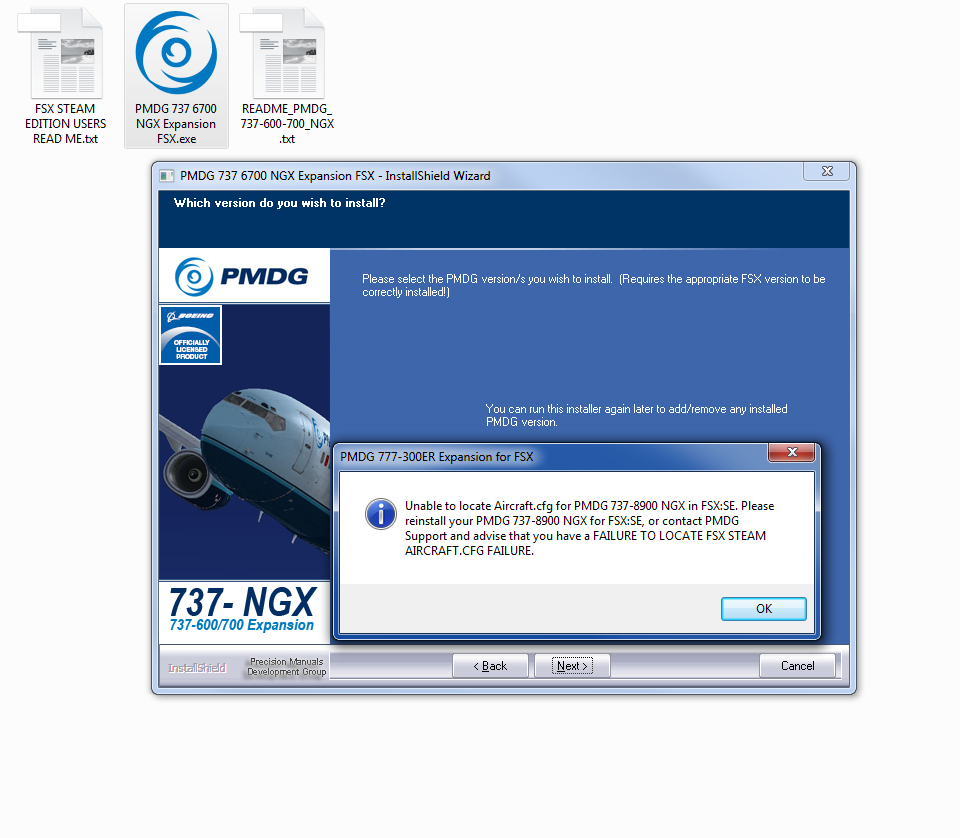
Having a bit of a problem with this also. Purchased yesterday and the screenshot captures how far I got with an install. Opened a ticket at the help desk but haven't heard anything. Sure would like to fly these. Not given a choice of which version to install and the pop-up is for the 777. I do FSX-SE installed but no PMDG product associated with it.
-
I am very late in thanking you for this info. I had found that site also but just have not tried it as yet!
-
Thanks Dave, Most 3rd party applications to FSX and P3D update their AIRAC data individually through Aerosoft or Navigraph. I've never known nor seen that data in the sims themselves hence no sids nor stars. Wouldn't it be great to apply that data directly to FSX, P3D and X-plane. Then the data would always be fresh and correct. Regards, Ralph.
-
Hi Dave, Having the same problem with FSX. After creating a flight plan in P2ATC I export it to FSX . Finding the *.pln in FSX and then loading it nothing at all happens. Granted that P2ATC is for the ATC, it would be great to load the plan and then follow the flight on the MFD or use the GPS for navigation. Same with P3D V3.1. Problem seems to be the incompatible databases. When I designate the COS4 SID and the rwy 32 approach into KRAP, the SID nor the way points in the approach are not in the database. If I remove them and create a flight plan with simple VOR to VOR way points the plan will load into FSX and P3D just fine. That's all I know today! Thanks Dave. Ralph Zimmerman
-
From the FAA PILOT/CONTROLLER GLOSSERY: LINE UP AND WAIT (LUAW)− Used by ATC to inform a pilot to taxi onto the departure runway to line up and wait. It is not authorization for takeoff. It is used when takeoff clearance cannot immediately be issued because of traffic or other reasons. (See CLEARED FOR TAKEOFF.) CLEARED FOR TAKEOFF− ATC authorization for an aircraft to depart. It is predicated on known traffic and known physical airport conditions. Hope this helps. Blue Skies, Ralph Zimmerman
-
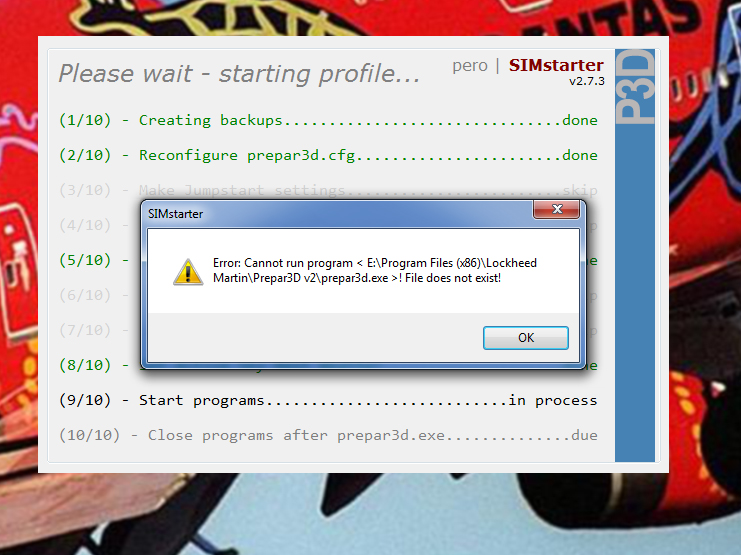
Just getting around to trying to use Simstarter with P3D v3. Works just great with FSX. I have removed every instance of P3D v2 from my computer yet when I try to launch it complains that it is trying to start P3D v2 and the file does not exist. From the ini file: [PREPAR3D Pathdefinition] pathPREPAR3Dexe=E:\Program Files (x86)\Lockheed Martin\Prepar3D v3\Prepar3D.exe pathPREPAR3Dcfg=C:\Users\Ralph\AppData\Roaming\Lockheed Martin\Prepar3D v3\Prepar3D.cfg pathPREPAR3DsceneryCfg=C:\ProgramData\Lockheed Martin\Prepar3D v3\scenery.cfg pathPREPAR3DuserSimFiles=C:\Users\Ralph\Documents\Prepar3D v3 Files pathPREPAR3DFTXCentralExe=C:\Users\Ralph\AppData\Local\ORBX\FTXCentral\FTXCentral.exe pathPREPAR3DASNextExe= The attached is a screenshot of the error message I am getting. Pretty much stumped. Thanks for any help with this. Ralph Zimmerman Re-installing SIMstarter did not help. But removing the P3D profiles and startling them from scratch again solved the problem.
-
Thanks DesertPilot85! I didn't see that other post. Fixed now. Best regards, Ralph
-
Love the new version 2.7 but having a problem with new scenery manager which is awesome. When I close the scenery manager I am booted out of Simstarter and it fails to unload from memory. I have to use the task manager to unload Simstarter. Never had this in previous versions.
-
First few flights with 1.7.02 have been very good. It is obvious the amount of work that has gone into this product. Kudos to the entire team. This is the one that sets the bar high and will get even better as time goes by. My 2 cents - don't pass this one by.
-
I've had FSX since it came out and all the predecessors to it. Using Win7 Prof here with tons of add-ons collected over the years. Since I have fully implemented you DX10 Scenery Fixer, my frame rates at 50% better and my simulator has never looked so good nor ran so well. Thank you, Steve, for this wonderful experience.
-
Got both installed and working just fine on my machine. Lots to like on the Steam edition and at least two add-ons working well - FSTramp and MyTrafic Professional 5.4b so far.
-
After purchasing the 300ER, I did a clean install of the 777-200LR, then SP1, then the 300ER. No problems whatsoever with the Auto Time Compression here.
-
Thanks, Ray.
-
A new computer has me once again re installing tons of stuff and very high on the list was Radar Contact. Last night I reinstalled and used the built in function to request a key. I have received no key, my email has not been returned as undeliverable and you are white-listed Nothing in the spam folder either. Yesterday morning, looking at your forum on Avsim, I realized that I have no idea what my email address may have been when I first ordered or last requested a key to reinstall. So, I thought you may have just blown it off beacsue all of the required information was not there. So, I repurchased the program SWEG order Number Uxxxxxx5302. I downloaded and installed, used the built in tool to request a new key with this newly downloaded software and I stll have had no rely. Any help would be appreciated. Thank you.
-
Thanks, Steven. I did finally get registered at the support forum and have submitted a ticket there. Didn't know it was a whole separate login.
-
Thanks. I understand but I had to give identifying info for my account. I own a website so I'm hung out in public anyway! Also sorry for the duplicate posts. Kept getting a #503 error reports so it seemed as though nothing was posted.
-
Anxiously waiting for the 777 I ordered the 747-400 today from you through PayPal. I received all of the proper acknowledgement emails from both you and Paypal. I am unable to validate the install. My email is xxxxxxxxxxxxxxxxx. I can log into my account and see my previous purchase of the 737NGX product but my order today for the 747-400 does not appear. Sorry to bother you here but: Using the above email (my account) and password I cannot even log into support and ask for help. Something quite wrong it seems. I even turned off my windows 7 firewall and got nowhere. Please help! Thanks about $165,000.00 worth. Cheap price for the 777!. Ralph Zimmerman .
-
I am the owner of realatc.net. There is no problem with the site. Please try accessing it from either Firefox of Internet Explorer. Don't know what Google's problem is but their software (not search engines) having no problems. Something in a cache is usually the culprit. Blue skies, Ralph.
-
Thanks, Jim for the mention. The Special Edit V2 of the Ultimate RealATC files for PRO-ATC/X is released today with all but the center files and the real flights so far having passed the muster (about 2502 files)! Awaiting for some special coding from Pointsoft to finish up. Full details at my site. Blue skies, Ralph
-
Wow! Looks like a must have for me.

